In this example we had use JAVA Serlvet techonologies to work as middle ware to deal with oracle database.
Frontend is developed in AngularJS2.
AngularJS2 --> Servlet --> Oracle DB
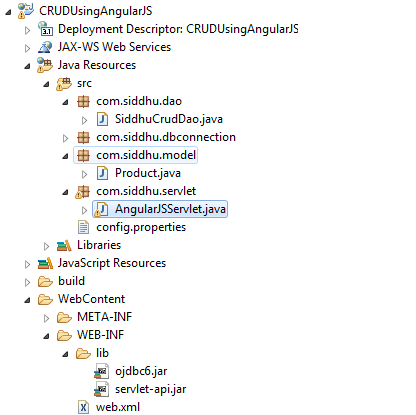
we had created Servlet using Eclipse dynamic web project
Folder Structure
Code :-
1:- SiddhuCrudDao
/**
*
*/
package com.siddhu.dao;
*
*/
package com.siddhu.dao;
import java.sql.Connection;
import java.sql.PreparedStatement;
import java.sql.ResultSet;
import java.sql.SQLException;
import java.text.ParseException;
import java.sql.PreparedStatement;
import java.sql.ResultSet;
import java.sql.SQLException;
import java.text.ParseException;
import com.siddhu.dbconnection.OracleDbConnection;
import com.siddhu.model.Product;
public class SiddhuCrudDao {
import com.siddhu.model.Product;
public class SiddhuCrudDao {
private Connection connection;
private int result;
private int result;
public SiddhuCrudDao() {
connection = OracleDbConnection.getConnection();
}
connection = OracleDbConnection.getConnection();
}
public int addUser(Product product) {
try {
try {
PreparedStatement preparedStatement = connection
.prepareStatement("insert into \"SIDDHU\".\"PRODUCT\"(NAME,QTY) values (?,?)");
preparedStatement.setString(1, product.getName());
preparedStatement.setString(2, product.getQty());
result= preparedStatement.executeUpdate();
.prepareStatement("insert into \"SIDDHU\".\"PRODUCT\"(NAME,QTY) values (?,?)");
preparedStatement.setString(1, product.getName());
preparedStatement.setString(2, product.getQty());
result= preparedStatement.executeUpdate();
} catch (SQLException e) {
e.printStackTrace();
}
return result;
}
e.printStackTrace();
}
return result;
}
public int deleteUser(String name) {
try {
PreparedStatement preparedStatement = connection
.prepareStatement("delete from SIDDHU.PRODUCT where name=?");
preparedStatement.setString(1, name);
result= preparedStatement.executeUpdate();
} catch (SQLException e) {
e.printStackTrace();
}
return result;
}
try {
PreparedStatement preparedStatement = connection
.prepareStatement("delete from SIDDHU.PRODUCT where name=?");
preparedStatement.setString(1, name);
result= preparedStatement.executeUpdate();
} catch (SQLException e) {
e.printStackTrace();
}
return result;
}
public int updateUser(Product product) throws ParseException {
try {
PreparedStatement preparedStatement = connection
.prepareStatement("update SIDDHU.PRODUCT set qty=?" +
" where name=?");
preparedStatement.setString(1, product.getQty());
preparedStatement.setString(2, product.getName());
result= preparedStatement.executeUpdate();
try {
PreparedStatement preparedStatement = connection
.prepareStatement("update SIDDHU.PRODUCT set qty=?" +
" where name=?");
preparedStatement.setString(1, product.getQty());
preparedStatement.setString(2, product.getName());
result= preparedStatement.executeUpdate();
} catch (SQLException e) {
e.printStackTrace();
}
return result;
}
e.printStackTrace();
}
return result;
}
public Product getUserById(String name) {
Product user = new Product();
try {
PreparedStatement preparedStatement = connection.
prepareStatement("select * from SIDDHU.PRODUCT where name=?");
preparedStatement.setString(1, name);
ResultSet rs = preparedStatement.executeQuery();
Product user = new Product();
try {
PreparedStatement preparedStatement = connection.
prepareStatement("select * from SIDDHU.PRODUCT where name=?");
preparedStatement.setString(1, name);
ResultSet rs = preparedStatement.executeQuery();
if (rs.next()) {
user.setName(rs.getString("name"));
user.setQty(rs.getString("qty"));
}
} catch (SQLException e) {
e.printStackTrace();
}
return user;
}
user.setName(rs.getString("name"));
user.setQty(rs.getString("qty"));
}
} catch (SQLException e) {
e.printStackTrace();
}
return user;
}
/*public static void main(String args[])
{
SiddhuCrudDao objSiddhuCrudDao = new SiddhuCrudDao();
User user=new User();
user.setName("sidhu");
user.setQty("1");
objSiddhuCrudDao.addUser(user);
}*/
{
SiddhuCrudDao objSiddhuCrudDao = new SiddhuCrudDao();
User user=new User();
user.setName("sidhu");
user.setQty("1");
objSiddhuCrudDao.addUser(user);
}*/
}
2:- OracleDbConnection
package com.siddhu.dbconnection;
import java.io.IOException;
import java.io.InputStream;
import java.sql.Connection;
import java.sql.DriverManager;
import java.sql.SQLException;
import java.util.Properties;
import java.io.IOException;
import java.io.InputStream;
import java.sql.Connection;
import java.sql.DriverManager;
import java.sql.SQLException;
import java.util.Properties;
public class OracleDbConnection {
private static Connection connection = null;
public static Connection getConnection() {
if (connection != null)
return connection;
else {
try {
Properties prop = new Properties();
//InputStream inputStream = DBUtility.class.getClassLoader().getResourceAsStream("/config.properties");
//InputStream inputStream = DBUtility.class.getClassLoader().getResourceAsStream("config.properties");
InputStream inputStream = OracleDbConnection.class.getClassLoader().getResourceAsStream("config.properties");
prop.load(inputStream);
String driver = prop.getProperty("driver");
String url = prop.getProperty("url");
String user = prop.getProperty("user");
String password = prop.getProperty("password");
Class.forName(driver);
connection = DriverManager.getConnection(url, user, password);
private static Connection connection = null;
public static Connection getConnection() {
if (connection != null)
return connection;
else {
try {
Properties prop = new Properties();
//InputStream inputStream = DBUtility.class.getClassLoader().getResourceAsStream("/config.properties");
//InputStream inputStream = DBUtility.class.getClassLoader().getResourceAsStream("config.properties");
InputStream inputStream = OracleDbConnection.class.getClassLoader().getResourceAsStream("config.properties");
prop.load(inputStream);
String driver = prop.getProperty("driver");
String url = prop.getProperty("url");
String user = prop.getProperty("user");
String password = prop.getProperty("password");
Class.forName(driver);
connection = DriverManager.getConnection(url, user, password);
/*// Store the database URL in a string
String serverName = "127.0.0.1";
String portNumber = "1521";
String sid = "XE";
String dbUrl = "jdbc:oracle:thin:@" + serverName + ":" + portNumber
+ ":" + sid;
String serverName = "127.0.0.1";
String portNumber = "1521";
String sid = "XE";
String dbUrl = "jdbc:oracle:thin:@" + serverName + ":" + portNumber
+ ":" + sid;
Class.forName("oracle.jdbc.driver.OracleDriver");
// set the url, username and password for the database
connection = DriverManager.getConnection(dbUrl, "siddhu", "siddhu"); */
// set the url, username and password for the database
connection = DriverManager.getConnection(dbUrl, "siddhu", "siddhu"); */
} catch (ClassNotFoundException e) {
e.printStackTrace();
} catch (SQLException e) {
e.printStackTrace();
} catch (IOException e) {
e.printStackTrace();
}
return connection;
}
e.printStackTrace();
} catch (SQLException e) {
e.printStackTrace();
} catch (IOException e) {
e.printStackTrace();
}
return connection;
}
}
public static void main(String[] args) {
// TODO Auto-generated method stub
//System.out.println("----------:"+OracleDbConnection.getConnection());
// TODO Auto-generated method stub
//System.out.println("----------:"+OracleDbConnection.getConnection());
}
}
3:- Product
package com.siddhu.model;
public class Product {
public class Product {
private String name;
private String qty;
public String getName() {
return name;
}
public void setName(String name) {
this.name = name;
}
public String getQty() {
return qty;
}
public void setQty(String qty) {
this.qty = qty;
}
@Override
public String toString() {
return "User [name=" + name + ", qty=" + qty + "]";
}
private String qty;
public String getName() {
return name;
}
public void setName(String name) {
this.name = name;
}
public String getQty() {
return qty;
}
public void setQty(String qty) {
this.qty = qty;
}
@Override
public String toString() {
return "User [name=" + name + ", qty=" + qty + "]";
}
}
4:- AngularJSServlet
package com.siddhu.servlet;
import java.io.IOException;
import java.io.PrintWriter;
import java.text.ParseException;
import java.io.PrintWriter;
import java.text.ParseException;
import javax.servlet.ServletException;
import javax.servlet.annotation.WebServlet;
import javax.servlet.http.HttpServlet;
import javax.servlet.http.HttpServletRequest;
import javax.servlet.http.HttpServletResponse;
import javax.servlet.annotation.WebServlet;
import javax.servlet.http.HttpServlet;
import javax.servlet.http.HttpServletRequest;
import javax.servlet.http.HttpServletResponse;
import com.siddhu.dao.SiddhuCrudDao;
import com.siddhu.model.Product;
import com.siddhu.model.Product;
/**
* Servlet implementation class AngularJSServlet
*/
@WebServlet("/AngularJSServlet")
public class AngularJSServlet extends HttpServlet {
private static final long serialVersionUID = 1L;
* Servlet implementation class AngularJSServlet
*/
@WebServlet("/AngularJSServlet")
public class AngularJSServlet extends HttpServlet {
private static final long serialVersionUID = 1L;
/**
* @see HttpServlet#HttpServlet()
*/
public AngularJSServlet() {
super();
// TODO Auto-generated constructor stub
}
* @see HttpServlet#HttpServlet()
*/
public AngularJSServlet() {
super();
// TODO Auto-generated constructor stub
}
/**
* @see HttpServlet#doGet(HttpServletRequest request, HttpServletResponse response)
*/
protected void doGet(HttpServletRequest request, HttpServletResponse response) throws ServletException, IOException {
// TODO Auto-generated method stub
String method = request.getParameter("method");
if("add".equalsIgnoreCase(method))
{
String name = request.getParameter("name");
String qty = request.getParameter("qty");
SiddhuCrudDao objSiddhuCrudDao = new SiddhuCrudDao();
Product user=new Product();
user.setName(name);
user.setQty(qty);
objSiddhuCrudDao.addUser(user);
/*PrintWriter out = response.getWriter();
out.println("Add opertion called successfully on client side:");*/
}
else if("delete".equalsIgnoreCase(method))
{
String name = request.getParameter("name");
String qty = request.getParameter("qty");
SiddhuCrudDao objSiddhuCrudDao = new SiddhuCrudDao();
objSiddhuCrudDao.deleteUser(name);
/*PrintWriter out = response.getWriter();
out.println("Add opertion called successfully on client side:");*/
}
else if("delete".equalsIgnoreCase(method))
{
String name = request.getParameter("name");
String qty = request.getParameter("qty");
SiddhuCrudDao objSiddhuCrudDao = new SiddhuCrudDao();
objSiddhuCrudDao.deleteUser(name);
/*PrintWriter out = response.getWriter();
out.println("Add opertion called successfully on client side:");*/
}
else if("update".equalsIgnoreCase(method))
{
try {
String name = request.getParameter("name");
String qty = request.getParameter("qty");
SiddhuCrudDao objSiddhuCrudDao = new SiddhuCrudDao();
Product user=new Product();
user.setName(name);
user.setQty(qty);
{
try {
String name = request.getParameter("name");
String qty = request.getParameter("qty");
SiddhuCrudDao objSiddhuCrudDao = new SiddhuCrudDao();
Product user=new Product();
user.setName(name);
user.setQty(qty);
objSiddhuCrudDao.updateUser(user);
} catch (ParseException e) {
// TODO Auto-generated catch block
e.printStackTrace();
}
}
} catch (ParseException e) {
// TODO Auto-generated catch block
e.printStackTrace();
}
}
else
{
String name = request.getParameter("name");
SiddhuCrudDao objSiddhuCrudDao = new SiddhuCrudDao();
Product user=new Product();
user = objSiddhuCrudDao.getUserById(name);
System.out.println("reached here:"+user.toString());
PrintWriter out = response.getWriter();
out.write("name = "+user.getName());
out.write("qty = "+user.getQty());
}
{
String name = request.getParameter("name");
SiddhuCrudDao objSiddhuCrudDao = new SiddhuCrudDao();
Product user=new Product();
user = objSiddhuCrudDao.getUserById(name);
System.out.println("reached here:"+user.toString());
PrintWriter out = response.getWriter();
out.write("name = "+user.getName());
out.write("qty = "+user.getQty());
}
//response.getWriter().append("Served at: ").append(request.getContextPath());
}
}
Execute above servlet web app on tomcat so that it can be called from AngularJS2 applcation.
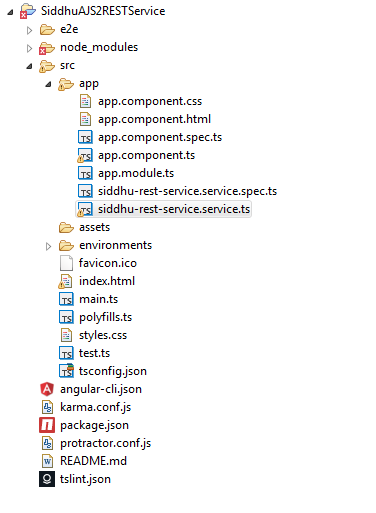
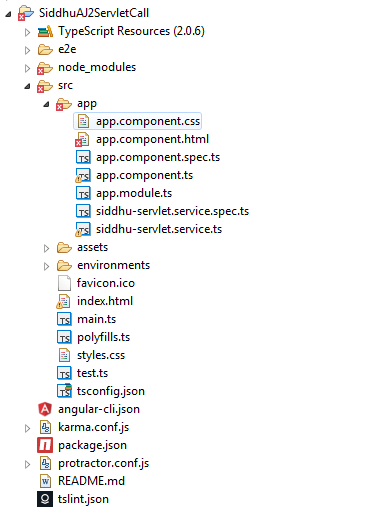
AngularJS2 Project Screen shot
Code:
1:- app.component.spec.ts
/* tslint:disable:no-unused-variable */
import { TestBed, async } from '@angular/core/testing';
import { AppComponent } from './app.component';
import { AppComponent } from './app.component';
describe('AppComponent', () => {
beforeEach(() => {
TestBed.configureTestingModule({
declarations: [
AppComponent
],
});
TestBed.compileComponents();
});
beforeEach(() => {
TestBed.configureTestingModule({
declarations: [
AppComponent
],
});
TestBed.compileComponents();
});
it('should create the app', async(() => {
let fixture = TestBed.createComponent(AppComponent);
let app = fixture.debugElement.componentInstance;
expect(app).toBeTruthy();
}));
let fixture = TestBed.createComponent(AppComponent);
let app = fixture.debugElement.componentInstance;
expect(app).toBeTruthy();
}));
it(`should have as title 'app works!'`, async(() => {
let fixture = TestBed.createComponent(AppComponent);
let app = fixture.debugElement.componentInstance;
expect(app.title).toEqual('app works!');
}));
let fixture = TestBed.createComponent(AppComponent);
let app = fixture.debugElement.componentInstance;
expect(app.title).toEqual('app works!');
}));
it('should render title in a h1 tag', async(() => {
let fixture = TestBed.createComponent(AppComponent);
fixture.detectChanges();
let compiled = fixture.debugElement.nativeElement;
expect(compiled.querySelector('h1').textContent).toContain('app works!');
}));
});
let fixture = TestBed.createComponent(AppComponent);
fixture.detectChanges();
let compiled = fixture.debugElement.nativeElement;
expect(compiled.querySelector('h1').textContent).toContain('app works!');
}));
});
2:- app.component.ts
import { Component } from '@angular/core';
import { SiddhuServletService } from './siddhu-servlet.service';
@Component({
selector: 'app-root',
templateUrl: './app.component.html',
styleUrls: ['./app.component.css']
})
export class AppComponent {
title = 'Performing CRUd Opeartion using Servlet in AngularJS2';
getServletAddResponse:string;
getServletDeleteResponse:string;
getServletUpdateResponse:string;
getServletGetResponse:string;
constructor(private siddhuservletservice: SiddhuServletService) { }
addProduct(method:string, name:string, qty:string) {
console.log('updateUser-'+method);
console.log('deleteUser-'+name);
console.log('deleteUser-'+qty);
this.siddhuservletservice
.addProduct(method, name, qty).subscribe(
data => this.getServletAddResponse = data, // put the data returned from the server in our variable
error => console.log("Error HTTP GET Service"), // in case of failure show this message
() => console.log("Add Job Done Get !")//run this code in all cases
);
}
deleteProduct(method:string, name:string, qty:string) {
console.log('updateUser-'+method);
console.log('deleteUser-'+name);
console.log('deleteUser-'+qty);
this.siddhuservletservice
.deleteProduct(method, name).subscribe(
data => this.getServletDeleteResponse = data, // put the data returned from the server in our variable
error => console.log("Error HTTP GET Service"), // in case of failure show this message
() => console.log("Delete Job Done Get !")//run this code in all cases
);
}
updateProduct(method:string, name:string, qty:string) {
console.log('updateUser-'+method);
console.log('updateUser-'+name);
console.log('updateUser-'+qty);
this.siddhuservletservice
.updateProduct(method, name,qty).subscribe(
data => this.getServletUpdateResponse = data, // put the data returned from the server in our variable
error => console.log("Error HTTP GET Service"), // in case of failure show this message
() => console.log("Update Job Done Get !")//run this code in all cases
);
}
getProduct(method:string, name:string) {
console.log('updateUser-'+method);
console.log('deleteUser-'+name);
this.siddhuservletservice
.getProduct(method, name).subscribe(
data => this.getServletGetResponse = data, // put the data returned from the server in our variable
error => console.log("Error HTTP GET Service"), // in case of failure show this message
() => console.log("Get Job Done Get !")//run this code in all cases
);
}
}
selector: 'app-root',
templateUrl: './app.component.html',
styleUrls: ['./app.component.css']
})
export class AppComponent {
title = 'Performing CRUd Opeartion using Servlet in AngularJS2';
getServletAddResponse:string;
getServletDeleteResponse:string;
getServletUpdateResponse:string;
getServletGetResponse:string;
constructor(private siddhuservletservice: SiddhuServletService) { }
addProduct(method:string, name:string, qty:string) {
console.log('updateUser-'+method);
console.log('deleteUser-'+name);
console.log('deleteUser-'+qty);
this.siddhuservletservice
.addProduct(method, name, qty).subscribe(
data => this.getServletAddResponse = data, // put the data returned from the server in our variable
error => console.log("Error HTTP GET Service"), // in case of failure show this message
() => console.log("Add Job Done Get !")//run this code in all cases
);
}
deleteProduct(method:string, name:string, qty:string) {
console.log('updateUser-'+method);
console.log('deleteUser-'+name);
console.log('deleteUser-'+qty);
this.siddhuservletservice
.deleteProduct(method, name).subscribe(
data => this.getServletDeleteResponse = data, // put the data returned from the server in our variable
error => console.log("Error HTTP GET Service"), // in case of failure show this message
() => console.log("Delete Job Done Get !")//run this code in all cases
);
}
updateProduct(method:string, name:string, qty:string) {
console.log('updateUser-'+method);
console.log('updateUser-'+name);
console.log('updateUser-'+qty);
this.siddhuservletservice
.updateProduct(method, name,qty).subscribe(
data => this.getServletUpdateResponse = data, // put the data returned from the server in our variable
error => console.log("Error HTTP GET Service"), // in case of failure show this message
() => console.log("Update Job Done Get !")//run this code in all cases
);
}
getProduct(method:string, name:string) {
console.log('updateUser-'+method);
console.log('deleteUser-'+name);
this.siddhuservletservice
.getProduct(method, name).subscribe(
data => this.getServletGetResponse = data, // put the data returned from the server in our variable
error => console.log("Error HTTP GET Service"), // in case of failure show this message
() => console.log("Get Job Done Get !")//run this code in all cases
);
}
}
3:- app.module.ts
import { BrowserModule } from '@angular/platform-browser';
import { NgModule } from '@angular/core';
import { FormsModule } from '@angular/forms';
import { HttpModule } from '@angular/http';
import { NgModule } from '@angular/core';
import { FormsModule } from '@angular/forms';
import { HttpModule } from '@angular/http';
import { AppComponent } from './app.component';
import { SiddhuServletService } from './siddhu-servlet.service';
import { SiddhuServletService } from './siddhu-servlet.service';
@NgModule({
declarations: [
AppComponent
],
imports: [
BrowserModule,
FormsModule,
HttpModule
],
providers: [SiddhuServletService],
bootstrap: [AppComponent]
})
export class AppModule { }
declarations: [
AppComponent
],
imports: [
BrowserModule,
FormsModule,
HttpModule
],
providers: [SiddhuServletService],
bootstrap: [AppComponent]
})
export class AppModule { }
4:- siddhu-servlet.service.ts
import { Injectable } from '@angular/core';
import {Http, Response, Headers, Request, RequestOptions, RequestMethod, URLSearchParams} from '@angular/http';
import { Observable } from 'rxjs/Observable';
import 'rxjs/add/operator/map';
import 'rxjs/add/operator/toPromise';
import 'rxjs/Rx';
import {Http, Response, Headers, Request, RequestOptions, RequestMethod, URLSearchParams} from '@angular/http';
import { Observable } from 'rxjs/Observable';
import 'rxjs/add/operator/map';
import 'rxjs/add/operator/toPromise';
import 'rxjs/Rx';
@Injectable()
export class SiddhuServletService {
private getServletUrl = 'http://localhost:8181/CRUDUsingAngularJS/AngularJSServlet'; // URL to web api
constructor(private _http: Http) {
}
//To Add User in the database.
addProduct(method: string, name: string, qty: string){
let params: URLSearchParams = new URLSearchParams();
params.set('method', method);
params.set('name', name);
params.set('qty', qty);
//const url = `${this.getServletUrl}/${id}`;
return this._http.get(this.getServletUrl, {
search: params
})
.map(response => response.text());
}
//To Delete in the database.
deleteProduct(method: string, name: string){
// const deleteServlerURL = `${this.getServletUrl}/${name}`;
let params: URLSearchParams = new URLSearchParams();
params.set('method', method);
params.set('name', name);
return this._http.get(this.getServletUrl, {
search: params
})
.map(response => response.text());
}
//To Update in the database.
updateProduct(method: string, name: string,qty: string){
let params: URLSearchParams = new URLSearchParams();
params.set('method', method);
params.set('name', name);
params.set('qty', qty);
return this._http.get(this.getServletUrl, {
search: params
})
.map(response => response.text());
}
//To getUser from id from the database.
getProduct(method: string, name: string){
//const getUserServlerURL = `${this.getServletUrl}/${name}`;
let params: URLSearchParams = new URLSearchParams();
params.set('method', method);
params.set('name', name);
return this._http.get(this.getServletUrl, {
search: params
})
.map(response => response.text());
}
}
5:- app.component.html
<!--div>
<!--h1>{{title}}<!--/h1>
<!--h1>{{title}}<!--/h1>
<!--div>
<!--label>Name: <!--/label> <!--input [(ngModel)]="name"
placeholder="name" />
<!--/div>
<!--div>
<!--label>Quantity: <!--/label> <!--input [(ngModel)]="qty"
placeholder="qty" />
<!--/div>
<!--label>Name: <!--/label> <!--input [(ngModel)]="name"
placeholder="name" />
<!--/div>
<!--div>
<!--label>Quantity: <!--/label> <!--input [(ngModel)]="qty"
placeholder="qty" />
<!--/div>
<!--div>
<!--button (click)="addProduct('add', name, qty)">Calling servlet to
add user<!--/button>
<!--/div>
<!--button (click)="addProduct('add', name, qty)">Calling servlet to
add user<!--/button>
<!--/div>
<!--div>
<!--label>The result after Add<!--/label> {{getServletAddResponse}}
<!--/div>
<!--label>The result after Add<!--/label> {{getServletAddResponse}}
<!--/div>
<!--div>
<!--button (click)="deleteProduct('delete',name)">Calling servlet
to Delete user<!--/button>
<!--/div>
<!--button (click)="deleteProduct('delete',name)">Calling servlet
to Delete user<!--/button>
<!--/div>
<!--div>
<!--label>The result after Delete<!--/label> {{getServletDeleteResponse}}
<!--/div>
<!--label>The result after Delete<!--/label> {{getServletDeleteResponse}}
<!--/div>
<!--div>
<!--button (click)="updateProduct('update',name,qty)">Calling servlet
to Update user<!--/button>
<!--/div>
<!--button (click)="updateProduct('update',name,qty)">Calling servlet
to Update user<!--/button>
<!--/div>
<!--div>
<!--label>The result after Update<!--/label> {{getServletUpdateResponse}}
<!--/div>
<!--label>The result after Update<!--/label> {{getServletUpdateResponse}}
<!--/div>
<!--div>
<!--button (click)="getProduct('getuser',name)">Calling servlet to
get user as per name<!--/button>
<!--/div>
<!--button (click)="getProduct('getuser',name)">Calling servlet to
get user as per name<!--/button>
<!--/div>
<!--div>
<!--label>The result after GetUser<!--/label> {{getServletGetResponse}}
<!--/div>
<!--/div>
<!--label>The result after GetUser<!--/label> {{getServletGetResponse}}
<!--/div>
<!--/div>
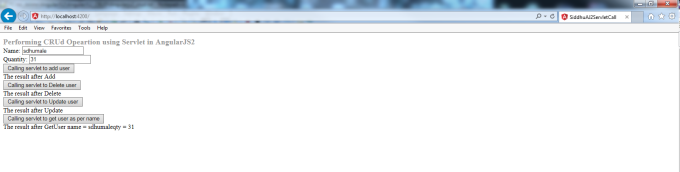
UI Screen of AngularJS2 on Browser