Jhipster as per the blogger is the tool that do marries frontend with backend.
This is tool we can use to generate monolithical, microservice project and provide the option to set the base project with frontend Angular, Vue and React. We can have java springboot microservice as middle ware and Any SQL (oracle, mysql etc )or NOSQL (redis, cassandra etc.)
So before starting to use Jhipster lets do the below setting religiously. As we are using oracle as backend we had created root user with admin rigts and all privileges.
1- Start the oracle
2- Create an user root as given below with all the privileges.
Oracle Connection
SQL>sqlplus / as sysdba
SQL> create user root identified by root;
create user root identified by root
*
ERROR at line 1:
ORA-65096: invalid common user or role name
SQL> alter session set “_ORACLE_SCRIPT”=true;
Session altered.
SQL> create user root identified by root;
User created.
SQL> grant sysdba to root;
Grant succeeded.
SQL> GRANT CREATE SESSION TO root;
Grant succeeded.
SQL> grant create table to root;
Grant succeeded.
SQL> grant all privileges to root;
Grant succeeded.
Finally execute the command as shown below in sequence.
Now lets try to install Jhipster to do that you will need following things
1- Install Java (https://adoptopenjdk.net/) and Node.js (https://nodejs.org/).
Once install check java and node are present in the machine using belwo commands.
C:\Users\Siddhartha>java -version
java version “16” 2021-03-16
Java(TM) SE Runtime Environment (build 16+36-2231)
Java HotSpot(TM) 64-Bit Server VM (build 16+36-2231, mixed mode, sharing)
C:\Users\Siddhartha>node -v
v17.6.0
C:\Users\Siddhartha>npm -v
8.5.1
2- Then install JHipster npm install -g generator-jhipster
3- create a jhipsterdemo folder i.e. C:\STS-Workspace\jhipsterdemo
4- Execute the following command as shown below.
5- Run JHipster and follow instructions on screen jhipster

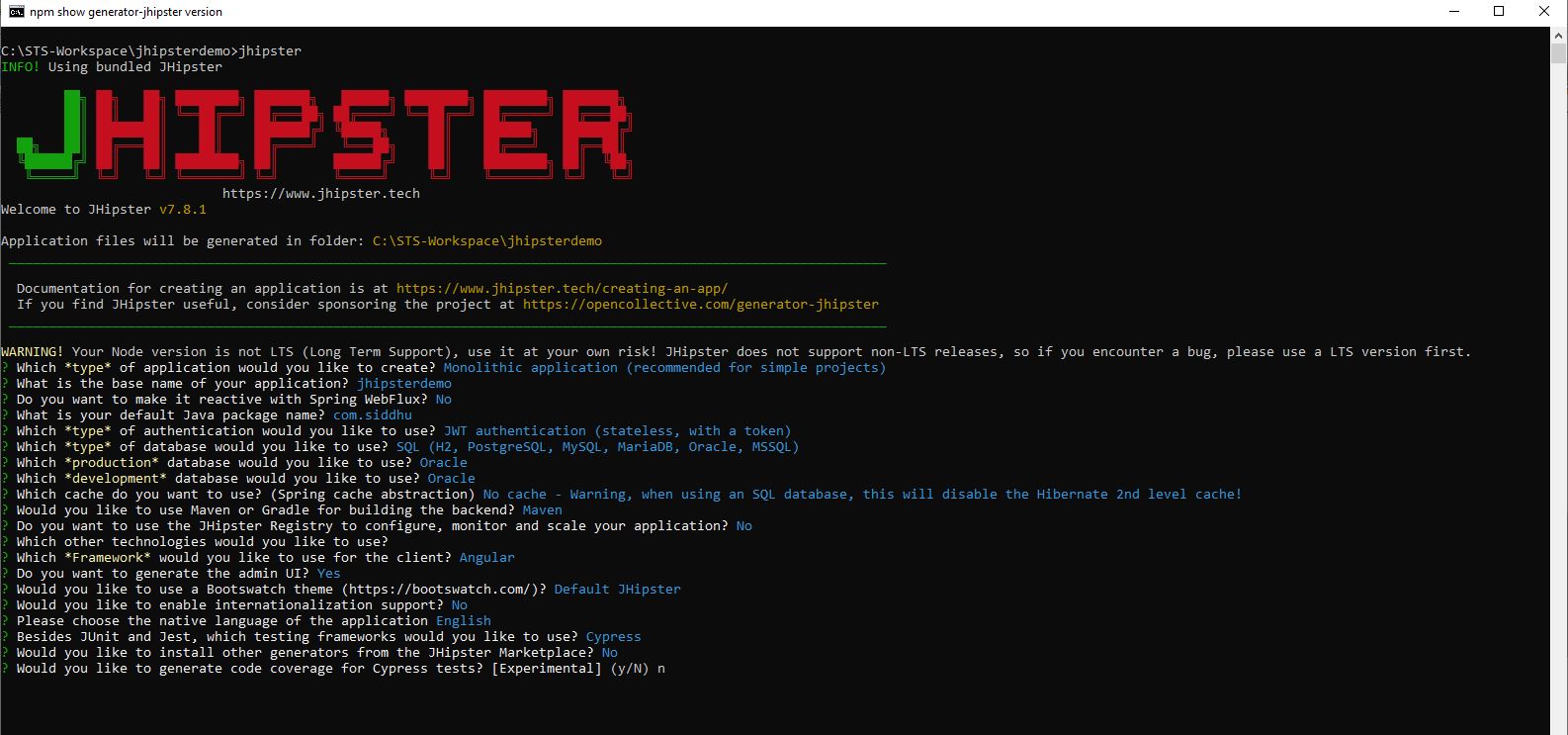
1 2 3 4 5 6 7 8 9 10 11 12 13 14 15 16 17 18 19 20 21 22 23 24 25 26 27 28 29 30 31 32 33 34 35 36 37 38 39 40 | C:\STS-Workspace\jhipsterdemo>jhipsterINFO! Using bundled JHipster ██╗ ██╗ ██╗ ████████╗ ███████╗ ██████╗ ████████╗ ████████╗ ███████╗ ██║ ██║ ██║ ╚══██╔══╝ ██╔═══██╗ ██╔════╝ ╚══██╔══╝ ██╔═════╝ ██╔═══██╗ ██║ ████████║ ██║ ███████╔╝ ╚█████╗ ██║ ██████╗ ███████╔╝ ██╗ ██║ ██╔═══██║ ██║ ██╔════╝ ╚═══██╗ ██║ ██╔═══╝ ██╔══██║ ╚██████╔╝ ██║ ██║ ████████╗ ██║ ██████╔╝ ██║ ████████╗ ██║ ╚██╗ ╚═════╝ ╚═╝ ╚═╝ ╚═══════╝ ╚═╝ ╚═════╝ ╚═╝ ╚═══════╝ ╚═╝ ╚═╝Welcome to JHipster v7.8.1Application files will be generated in folder: C:\STS-Workspace\jhipsterdemo _______________________________________________________________________________________________________________ Documentation for creating an application is at https://www.jhipster.tech/creating-an-app/ If you find JHipster useful, consider sponsoring the project at https://opencollective.com/generator-jhipster _______________________________________________________________________________________________________________WARNING! Your Node version is not LTS (Long Term Support), use it at your own risk! JHipster does not support non-LTS releases, so if you encounter a bug, please use a LTS version first.? Which *type* of application would you like to create? Monolithic application (recommended for simple projects)? What is the base name of your application? jhipsterdemo? Do you want to make it reactive with Spring WebFlux? No? What is your default Java package name? com.siddhu? Which *type* of authentication would you like to use? JWT authentication (stateless, with a token)? Which *type* of database would you like to use? SQL (H2, PostgreSQL, MySQL, MariaDB, Oracle, MSSQL)? Which *production* database would you like to use? Oracle? Which *development* database would you like to use? Oracle? Which cache do you want to use? (Spring cache abstraction) No cache - Warning, when using an SQL database, this will disable the Hibernate 2nd level cache!? Would you like to use Maven or Gradle for building the backend? Maven? Do you want to use the JHipster Registry to configure, monitor and scale your application? No? Which other technologies would you like to use?? Which *Framework* would you like to use for the client? Angular? Do you want to generate the admin UI? Yes? Would you like to use a Bootswatch theme (https://bootswatch.com/)? Default JHipster? Would you like to enable internationalization support? No? Please choose the native language of the application English? Besides JUnit and Jest, which testing frameworks would you like to use? Cypress? Would you like to install other generators from the JHipster Marketplace? No? Would you like to generate code coverage for Cypress tests? [Experimental] (y/N) n |
6- After successful installation you will get this screen

Server application generated successfully.
Run your Spring Boot application:
./mvnw (mvnw if using Windows Command Prompt)
Client application generated successfully.
Start your Webpack development server with:
npm start
jhipsterdemo@0.0.1-SNAPSHOT clean-www
rimraf target/classes/static/app/{src,target/}
Congratulations, JHipster execution is complete!
Sponsored with  by @oktadev.
7- change the name of user in application-dev.yml (C:\STS-Workspace\jhipsterdemo\src\main\resources\config)
datasource:
type: com.zaxxer.hikari.HikariDataSource
url: jdbc:oracle:thin:@localhost:1521:xe
username: root
password: root
hikari:
poolName: Hikari
auto-commit: false
Note:-If you dont do above changes you will get this error on the screen when you run mvnw
2022-06-13 11:47:33.275 ERROR 4900 — [ restartedMain] com.zaxxer.hikari.pool.HikariPool : Hikari – Exception during pool initialization.
java.sql.SQLException: ORA-01017: invalid username/password; logon denied
8- Now as we are using windows run below command
C:\STS-Workspace\jhipsterdemo>mvnw
once you see this message it indicate setup is done and now you are ready to open the application by hitting this url on the browser.


Hit his url http://localhost:8080/ and login using credetial admin and admin.


As we have us cypres for end to end testing this can be done using this command.
run below command
C:\STS-Workspace\jhipsterdemo>npm run e2e
if you get belwo error

update cypress.json (C:\STS-Workspace\jhipsterdemo) and add
“projectId”: “siddhu”,
again execute the command.
C:\STS-Workspace\jhipsterdemo>npx cypress open –config-file C:/STS-Workspace/jhipsterdemo/cypress.json


Now lets try to create our own Entity. You can take the base .jdl files from belwo url
https://start.jhipster.tech/jdl-studio/
Lets modify it to our content
C:\STS-Workspace\jhipsterdemo\jhipster-jdl.jdl
entity Employee {
firstName String,
lastName String
}
excute this command in the cmd prompt
C:\STS-Workspace\jhipsterdemo>jhipster jdl jhipster-jdl.jdl
It will ask for few of the files to overwrite it approve all usign ‘a’
C:\STS-Workspace\jhipsterdemo>jhipster jdl jhipster-jdl.jdl
1 2 3 4 5 6 7 8 9 10 11 12 13 14 15 16 17 18 19 20 21 22 23 24 25 26 27 28 29 30 31 32 33 34 35 36 37 38 39 40 41 42 43 44 45 46 47 48 49 50 51 52 53 54 55 56 57 58 59 60 61 62 63 64 65 66 67 68 69 70 71 72 73 74 75 76 77 78 79 80 81 82 83 84 85 86 87 88 89 90 91 92 93 94 95 96 97 98 99 100 101 102 103 104 105 106 107 108 109 110 111 112 113 114 115 116 | INFO! Switching to JHipster installed locally in current project's node repository (node_modules) ██╗ ██╗ ██╗ ████████╗ ███████╗ ██████╗ ████████╗ ████████╗ ███████╗ ██║ ██║ ██║ ╚══██╔══╝ ██╔═══██╗ ██╔════╝ ╚══██╔══╝ ██╔═════╝ ██╔═══██╗ ██║ ████████║ ██║ ███████╔╝ ╚█████╗ ██║ ██████╗ ███████╔╝ ██╗ ██║ ██╔═══██║ ██║ ██╔════╝ ╚═══██╗ ██║ ██╔═══╝ ██╔══██║ ╚██████╔╝ ██║ ██║ ████████╗ ██║ ██████╔╝ ██║ ████████╗ ██║ ╚██╗ ╚═════╝ ╚═╝ ╚═╝ ╚═══════╝ ╚═╝ ╚═════╝ ╚═╝ ╚═══════╝ ╚═╝ ╚═╝Welcome to JHipster v7.8.1INFO! Executing import-jdl jhipster-jdl.jdlINFO! The JDL is being parsed.INFO! Found entities: Employee.INFO! The JDL has been successfully parsedINFO! Generating 0 applications.INFO! Generating 1 entity.INFO! Generating entities for application undefined in a new parallel processFound the .jhipster\Employee.json configuration file, entity can be automatically generated! info Creating changelog for entities Employee force .yo-rc.json force .jhipster\Employee.json create src\main\resources\config\liquibase\changelog\20220613064856_added_entity_Employee.xml create src\main\resources\config\liquibase\fake-data\employee.csv conflict src\main\resources\config\liquibase\master.xml? Overwrite src\main\resources\config\liquibase\master.xml? overwrite force src\main\resources\config\liquibase\master.xml create src\main\java\com\siddhu\repository\EmployeeRepository.java create src\main\webapp\app\entities\employee\service\employee.service.ts create src\test\java\com\siddhu\web\rest\EmployeeResourceIT.java create src\main\webapp\app\entities\employee\update\employee-update.component.html create src\test\java\com\siddhu\domain\EmployeeTest.java create src\main\webapp\app\entities\employee\delete\employee-delete-dialog.component.html create src\main\webapp\app\entities\employee\employee.model.ts create src\main\webapp\app\entities\employee\update\employee-update.component.ts create src\main\webapp\app\entities\employee\list\employee.component.html create src\main\webapp\app\entities\employee\delete\employee-delete-dialog.component.ts create src\main\webapp\app\entities\employee\detail\employee-detail.component.html create src\main\webapp\app\entities\employee\detail\employee-detail.component.spec.ts create src\main\webapp\app\entities\employee\employee.module.ts create src\main\webapp\app\entities\employee\list\employee.component.spec.ts create src\main\java\com\siddhu\domain\Employee.java create src\main\webapp\app\entities\employee\route\employee-routing.module.ts create src\main\webapp\app\entities\employee\route\employee-routing-resolve.service.spec.ts create src\main\webapp\app\entities\employee\route\employee-routing-resolve.service.ts create src\main\webapp\app\entities\employee\service\employee.service.spec.ts create src\main\webapp\app\entities\employee\list\employee.component.ts create src\main\webapp\app\entities\employee\update\employee-update.component.spec.ts create src\main\java\com\siddhu\web\rest\EmployeeResource.java create src\main\webapp\app\entities\employee\detail\employee-detail.component.ts create src\main\webapp\app\entities\employee\delete\employee-delete-dialog.component.spec.ts create src\test\javascript\cypress\integration\entity\employee.spec.ts conflict src\main\webapp\app\entities\entity-routing.module.ts? Overwrite src\main\webapp\app\entities\entity-routing.module.ts? overwrite force src\main\webapp\app\entities\entity-routing.module.ts conflict src\main\webapp\app\layouts\navbar\navbar.component.html? Overwrite src\main\webapp\app\layouts\navbar\navbar.component.html? overwrite force src\main\webapp\app\layouts\navbar\navbar.component.html force .yo-rc.json force .jhipster\Employee.jsonNo change to package.json was detected. No package manager install will be executed.Entity Employee generated successfully.Running `webapp:build` to update client app> jhipsterdemo@0.0.1-SNAPSHOT webapp:build> npm run clean-www && npm run webapp:build:dev> jhipsterdemo@0.0.1-SNAPSHOT clean-www> rimraf target/classes/static/app/{src,target/}> jhipsterdemo@0.0.1-SNAPSHOT webapp:build:dev> ng build --configuration developmentNode.js version v17.6.0 detected.Odd numbered Node.js versions will not enter LTS status and should not be used for production. For more information, please see https://nodejs.org/en/about/releases/.? Would you like to share anonymous usage data about this project with the Angular Team atGoogle under Google’s Privacy Policy at https://policies.google.com/privacy? For moredetails and how to change this setting, see https://angular.io/analytics. No√ Browser application bundle generation complete.√ Copying assets complete.√ Index html generation complete.Initial Chunk Files | Names | Raw Sizestyles.css | styles | 205.42 kB |polyfills.js | polyfills | 134.24 kB |runtime.js | runtime | 12.47 kB |main.js | main | 790 bytes | | Initial Total | 352.89 kBLazy Chunk Files | Names | Raw Sizesrc_main_webapp_bootstrap_ts.js | bootstrap | 4.76 MB |src_main_webapp_app_admin_metrics_metrics_module_ts.js | metrics-metrics-module | 169.26 kB |src_main_webapp_app_account_account_module_ts.js | account-account-module | 157.15 kB |src_main_webapp_app_admin_user-management_user-management_module_ts.js | user-management-user-management-module | 105.50 kB |src_main_webapp_app_entities_employee_employee_module_ts.js | employee-employee-module | 67.52 kB |src_main_webapp_app_admin_health_health_module_ts.js | health-health-module | 29.06 kB |src_main_webapp_app_admin_configuration_configuration_module_ts.js | configuration-configuration-module | 25.47 kB |src_main_webapp_app_admin_logs_logs_module_ts.js | logs-logs-module | 23.56 kB |src_main_webapp_app_login_login_module_ts.js | login-login-module | 16.37 kB |src_main_webapp_app_admin_docs_docs_module_ts.js | docs-docs-module | 4.73 kB |src_main_webapp_app_admin_admin-routing_module_ts.js | admin-admin-routing-module | 4.14 kB |src_main_webapp_app_entities_entity-routing_module_ts.js | entities-entity-routing-module | 2.27 kB |common.js | common | 2.09 kB |Build at: 2022-06-13T06:52:59.103Z - Hash: fa9e1d98a085a051 - Time: 95293msINFO! Generator entities succeedCongratulations, JHipster execution is complete!Sponsored with <img draggable="false" role="img" class="emoji" alt=" |

Once you open the url you will fine the Employee is created and same table is also created in Oracle table. You will notice there are many dummy data present in the table that is due to below parameter faker if you dont want the dummy data remove the faker from the contexts and it will not create the data. Liquibase is used to create the schema and table for us.
liquibase:
# Remove ‘faker’ if you do not want the sample data to be loaded automatically
contexts: dev, faker
Restart the application using this command
C:\STS-Workspace\jhipsterdemo>mvnw
directly open the url and see you will be able to see the Employee entity now.


