Tuesday, July 19, 2016

How to call REST API using SOAPUI and Basic Authentication

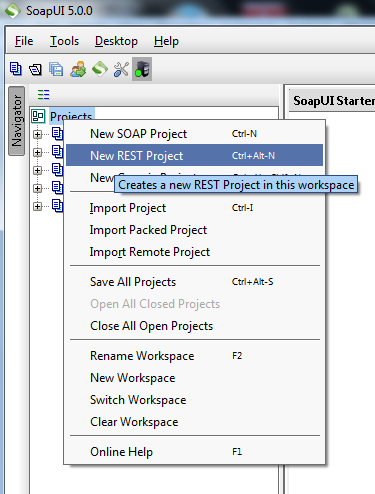
1- Create New SOAP Rest project
Image_1

2- Provide REST Project URL
Image_2

3- Set up Basic Auth

Image_3

4- Click on new basic
Image_4
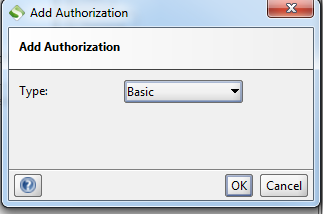
Select Basic Auth
Image_5


5- Enter User Id and Passwd and select Authenticate pre-emptively radio button
Image_6
Add your resource 
Image_7

Run your request and you will be able to get response in xml, JSON, HTML and RAW.

Monday, July 18, 2016

Calling JIRA REST Web service (Basic Authentication) in android and getting response in JSON.


1- MainActivity

package restapi.siddhu.test.com.restapi;

import android.os.Bundle;
import android.support.design.widget.FloatingActionButton;
import android.support.design.widget.Snackbar;
import android.support.v7.app.AppCompatActivity;
import android.support.v7.widget.Toolbar;
import android.view.View;
import android.view.Menu;
import android.view.MenuItem;

import android.os.AsyncTask;
import android.view.View.OnClickListener;
import android.widget.Button;
import android.widget.EditText;

import org.json.JSONArray;
import org.json.JSONException;
import org.json.JSONObject;

import com.sun.jersey.api.client.Client;
import com.sun.jersey.api.client.ClientHandlerException;
import com.sun.jersey.api.client.ClientResponse;
import com.sun.jersey.api.client.WebResource;
import com.sun.jersey.core.util.Base64;


public class MainActivity extends AppCompatActivity {

    String text = "siddhu";
    Button b;
    private static String BASE_URL = "https://yourjiraaddress.com";

    @Override
    protected void onCreate(Bundle savedInstanceState) {
        super.onCreate(savedInstanceState);
        setContentView(R.layout.activity_main);
        Toolbar toolbar = (Toolbar) findViewById(R.id.toolbar);
        setSupportActionBar(toolbar);

        b = (Button)findViewById(R.id.my_button);
        b.setOnClickListener(new View.OnClickListener() {
            @Override
            public void onClick(View v) {

                b.setClickable(false);
                //Create instance for AsyncCallWSGetProjectInfo
                AsyncCallWSGetRetrospect objAsyncCallWSGetRetrospect = new AsyncCallWSGetRetrospect();
                //Call execute
                objAsyncCallWSGetRetrospect.execute();
                // Inflate the layout for this fragment
            }
        });
    }


    private class AsyncCallWSGetRetrospect extends AsyncTask {

        @Override
        protected Void doInBackground(String... params) {
            String auth = new String(Base64.encode("userid:password"));
            try {
            String projects = invokeGetMethod(auth, BASE_URL+"/rest/api/2/project");
            System.out.println(projects);

            JSONArray projectArray = new JSONArray(projects);
            for (int i = 0; i < projectArray.length(); i++) {
                JSONObject proj = projectArray.getJSONObject(i);
                System.out.println("Key:"+proj.getString("key")+", Name:"+proj.getString("name"));
                text = text + "Key:"+proj.getString("key")+", Name:"+proj.getString("name");
            }
            } catch (Exception e) {
                System.out.println("Username or Password wrong!");
                e.printStackTrace();
            }
            return null;
        }
        @Override
        protected void onPostExecute(Void result) {
            if (text!=null) {
                EditText et = (EditText)findViewById(R.id.my_edit);
                et.setText(text);
            }
            Button b = (Button)findViewById(R.id.my_button);
            b.setClickable(true);
        }

        @Override
        protected void onPreExecute() {
            //Toast.makeText(getContext(), "Fetching Retrospect information of Sprint ...", Toast.LENGTH_SHORT).show();
            //loading.show();
        }

        @Override
        protected void onProgressUpdate(Void... values) {

        }
    }

    private static String invokeGetMethod(String auth, String url) throws Exception, ClientHandlerException {
        Client client = Client.create();
        WebResource webResource = client.resource(url);
        ClientResponse response = webResource.header("Authorization", "Basic " + auth).type("application/json")
                .accept("application/json").get(ClientResponse.class);
        int statusCode = response.getStatus();
        if (statusCode == 401) {
            throw new Exception("Invalid Username or Password");
        }
        return response.getEntity(String.class);
    }

    @Override
    public boolean onCreateOptionsMenu(Menu menu) {
        // Inflate the menu; this adds items to the action bar if it is present.
        getMenuInflater().inflate(R.menu.menu_main, menu);
        return true;
    }

    @Override
    public boolean onOptionsItemSelected(MenuItem item) {
        // Handle action bar item clicks here. The action bar will
        // automatically handle clicks on the Home/Up button, so long
        // as you specify a parent activity in AndroidManifest.xml.
        int id = item.getItemId();

        //noinspection SimplifiableIfStatement
        if (id == R.id.action_settings) {
            return true;
        }

        return super.onOptionsItemSelected(item);
    }
}


2- content_main.xml

    TextView
        android:layout_width="fill_parent"
        android:layout_height="wrap_content"
        android:text="Http GET Demo"
    Button
        android:layout_width="wrap_content"
        android:layout_height="wrap_content"
        android:layout_gravity="center"
        android:text="GET"
        android:id="@+id/my_button"
        android:layout_below="@+id/my_edit"
        android:layout_alignLeft="@+id/my_edit"
        android:layout_alignStart="@+id/my_edit"
        android:layout_marginTop="62dp" 
    EditText
        android:layout_margin="20dip"
        android:layout_width="fill_parent"
        android:layout_height="wrap_content"
        android:minLines="15"
        android:maxLines="15"
        android:textSize="12sp"
        android:editable="false"
        android:id="@+id/my_edit"


3- AndrodManifest.xml


   uses-permission android:name="android.permission.INTERNET"


Note: Please add following jar in android studio/project
jersey-client-1.8.jar
jersey-core-1.8.jar
json-20090211.jar
rest-client-1.0.jar


Sunday, July 03, 2016

How to add progress bar in android

1- In activity class use below code

ProgressDialog loading = null;
Inside onCreate method:-
loading = new ProgressDialog(ProjectPageActivity.this);
        loading.setMessage("Please wait...");
        loading.setCancelable(false);
        loading.setIndeterminate(true);
        loading.setProgressStyle(ProgressDialog.STYLE_SPINNER);

2- Use below code to show the progress graph

            loading.show();

3- Use below code to hide it
loading.dismiss();

Add back functionality with button on android and icon

Use following code to add back button functionality in android
Image2
toolbar = (Toolbar) findViewById(R.id.toolbar);
toolbar.setNavigationIcon(R.drawable.arwbck);
toolbar.setOverflowIcon(getResources().getDrawable(R.drawable.menuicn));
toolbar.setTitleTextColor(Color.RED);
setSupportActionBar(toolbar);
getSupportActionBar().setDisplayHomeAsUpEnabled(true);
getSupportActionBar().setHomeButtonEnabled(true);

@Override
public boolean onSupportNavigateUp(){
finish();
return true;
}


How to use expandableview and list view

1- XML modification
Add following tag in your xml. This will assist us in showing list.
android:id="@+id/listProject"
android:layout_width="fill_parent"
android:layout_height="wrap_content"
android:divider="#b5b5b5"
android:dividerHeight="1dp"
android:listSelector="@drawable/list_selector">


ListView1

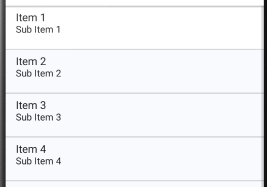
2- Now add Items in list.Create a new *.xml and add below code in it. This xmls define what you want to show in above image
We are showing only Project name in the list

android:id="@+id/tvProjectName"
android:layout_width="wrap_content"
android:layout_height="wrap_content"
android:paddingBottom ="9dip"
android:text="@string/tvProjectName"
android:textColor="#040404"
android:textSize="20dip"
android:textStyle="bold"
android:typeface="sans"
android:layout_alignParentLeft="true"
android:layout_alignParentStart="true" />

3- In project activity java code use below line
// List items
ListView list;
ProjectBinderData adapter = null;
List> projectDataCollection;
HashMap mapSingleProjectDataCollection;
try {
projectDataCollection = new ArrayList>();
for(int i=0;i{
mapSingleProjectDataCollection = new HashMap();
mapSingleProjectDataCollection.put(KEY_PROJECT_ID, projectInfoList[i].getProperty("projectId").toString()); try {
projectDataCollection = new ArrayList>();
for(int i=0;i{
mapSingleProjectDataCollection = new HashMap();
mapSingleProjectDataCollection.put(KEY_PROJECT_ID, projectInfoList[i].getProperty("projectId").toString());
mapSingleProjectDataCollection.put(KEY_PROJECT_NAME, projectInfoList[i].getProperty("projectName").toString());
projectDataCollection.add(mapSingleProjectDataCollection);
}
//Add to the Arraylist
ProjectBinderData bindingData = new ProjectBinderData(ProjectPageActivity.this,projectDataCollection);

list = (ListView) findViewById(R.id.listProject);
Log.i("BEFORE", "<<------------- before="" setadapter--------------="">>");
list.setAdapter(bindingData);
Log.i("AFTER", "<<------------- after="" setadapter--------------="">>");
// Click event for single list row and send the data to sprint page.
list.setOnItemClickListener(new AdapterView.OnItemClickListener() {
public void onItemClick(AdapterView parent, View view,
int position, long id) {
Intent i = new Intent();
i.setClass(ProjectPageActivity.this, SprintPageActivity.class);
// parameters
i.putExtra("projectId", projectDataCollection.get(position).get(KEY_PROJECT_ID));
i.putExtra("projectViewId", projectViewId);
// start the sample activity
startActivity(i);
}
});
}
catch (Exception ex) {
//Toast.makeText(getApplicationContext(), "System Error Please try after some time !!!!!",Toast.LENGTH_SHORT).show();
ex.printStackTrace();
}
mapSingleProjectDataCollection.put(KEY_PROJECT_NAME, projectInfoList[i].getProperty("projectName").toString());
mapSingleProjectDataCollection.put(KEY_CURRENT_SPRINT, "Current Sprint "+projectInfoList[i].getProperty("completedSprint").toString()+"/"+projectInfoList[i].getProperty("totalSprint").toString());
mapSingleProjectDataCollection.put(KEY_TOTAL_SPRINT, projectInfoList[i].getProperty("totalSprint").toString());
mapSingleProjectDataCollection.put(KEY_COMPLETED_SPRINT, projectInfoList[i].getProperty("completedSprint").toString());
mapSingleProjectDataCollection.put(KEY_PROJECT_START_DATE, projectInfoList[i].getProperty("projectStartDate").toString());
mapSingleProjectDataCollection.put(KEY_PROJECT_END_DATE, projectInfoList[i].getProperty("projectEndDate").toString());
mapSingleProjectDataCollection.put(KEY_RAG_STATUS, projectInfoList[i].getProperty("ragStatus").toString());
mapSingleProjectDataCollection.put(KEY_PROJECT_STATUS, projectInfoList[i].getProperty("projectStatus").toString());
projectDataCollection.add(mapSingleProjectDataCollection);
}
//Add to the Arraylist
ProjectBinderData bindingData = new ProjectBinderData(ProjectPageActivity.this,projectDataCollection);

list = (ListView) findViewById(R.id.listProject);
Log.i("BEFORE", "<<------------- before="" setadapter--------------="">>");
list.setAdapter(bindingData);
Log.i("AFTER", "<<------------- after="" setadapter--------------="">>");
// Click event for single list row and send the data to sprint page.
list.setOnItemClickListener(new AdapterView.OnItemClickListener() {
public void onItemClick(AdapterView parent, View view,
int position, long id) {
Intent i = new Intent();
i.setClass(ProjectPageActivity.this, SprintPageActivity.class);
// parameters
i.putExtra("projectId", projectDataCollection.get(position).get(KEY_PROJECT_ID));
i.putExtra("projectViewId", projectViewId);
// start the sample activity
startActivity(i);
}
});
}
catch (Exception ex) {
//Toast.makeText(getApplicationContext(), "System Error Please try after some time !!!!!",Toast.LENGTH_SHORT).show();
ex.printStackTrace();
}
4- Create a new class ProjectBinderData
public class ProjectBinderData extends BaseAdapter {

static final String KEY_PROJECT_ID = "KEY_PROJECT_ID";
static final String KEY_PROJECT_NAME= "KEY_PROJECT_NAME";

LayoutInflater inflater;
List> projectDataCollection;
ViewHolder holder;
public ProjectBinderData() {
// TODO Auto-generated constructor stub
}
public ProjectBinderData(Activity act, List> map) {
this.projectDataCollection = map;
inflater = (LayoutInflater) act
.getSystemService(Context.LAYOUT_INFLATER_SERVICE);
}

public int getCount() {
// TODO Auto-generated method stub
// return idlist.size();
return projectDataCollection.size();
}
public Object getItem(int arg0) {
// TODO Auto-generated method stub
return null;
}
public long getItemId(int position) {
// TODO Auto-generated method stub
return 0;
}
public View getView(int position, View convertView, ViewGroup parent) {
View vi=convertView;
if(convertView==null){
vi = inflater.inflate(R.layout.list_project, null);
holder = new ViewHolder();
holder.tvProjectName = (TextView)vi.findViewById(R.id.tvProjectName); // Project name
vi.setTag(holder);
}
else{
holder = (ViewHolder)vi.getTag();
}
// Setting all values in listview
holder.tvProjectName.setText(projectDataCollection.get(position).get(KEY_PROJECT_NAME));
return vi;
}
/*
*
* */
static class ViewHolder{
TextView tvProjectName;
}
}

How to use Decoview chart i.e. Google Fit in android

Decoview

1- XML class to tag Deco View element
xmlns:custom="http://schemas.android.com/apk/res-auto"
custom:dv_lineWidth="5dp"
android:id="@+id/dynamicArcView"
android:layout_width="100dp"
android:layout_height="100dp"
android:layout_toRightOf="@+id/tvProjectEndDate"
android:layout_above="@+id/projectStatus"
android:layout_alignParentTop="true">
android:id="@+id/percentage"
android:layout_width="60dp"
android:layout_height="40dp"
android:textAppearance="?android:attr/textAppearanceLarge"
android:textSize="30sp"
android:layout_above="@+id/tvProjectEndDate"
android:layout_toRightOf="@+id/textView5"
android:layout_toEndOf="@+id/textView5"
android:layout_marginLeft="30dp"
android:layout_marginBottom="10dp" />

2- Make following change in corresponding Activity JAVA class.
//Adding the coe to show the graph start

//SeriesItem seriesItem = new SeriesItem.Builder(Color.parseColor("#00B0CA"))
SeriesItem seriesItem = new SeriesItem.Builder(Color.parseColor("#e60000"))
.setRange(0, 100, 0)
.build();
//first 0 indicate start, second 100 indicate we have to cover 100% area of the round graph and thrid 0 indidate current starting point.
final DecoView decoView = (com.hookedonplay.decoviewlib.DecoView)vi.findViewById(R.id.dynamicArcView);
final int backIndex = decoView.addSeries(seriesItem);
/*decoView.addEvent(new DecoEvent.Builder(50)
.setIndex(backIndex)
.build());cmd
*/
int series1Index = decoView.addSeries(seriesItem);
final TextView textPercentage = (TextView)vi.findViewById(R.id.percentage);
final float totalSprint = Float.parseFloat(projectDataCollection.get(position).get(KEY_TOTAL_SPRINT));
final float completedSprint = Float.parseFloat(projectDataCollection.get(position).get(KEY_COMPLETED_SPRINT));
float percentBuild = (completedSprint/totalSprint);
//Above code is to calculate perfect % Value that need to be show inside graph
decoView.addEvent(new DecoEvent.Builder(percentBuild * 100f)
.setIndex(backIndex)
.build());
seriesItem.addArcSeriesItemListener(new SeriesItem.SeriesItemListener() {
@Override
public void onSeriesItemAnimationProgress(float percentComplete, float currentPosition) {
float percentFilled = (completedSprint/totalSprint);
textPercentage.setText(String.format("%.0f%%", percentFilled * 100f));
textPercentage.setTextColor(Color.parseColor("#e60000"));
}
@Override
public void onSeriesItemDisplayProgress(float percentComplete) {
}
});
//Adding the code to show the graph End]

3- Add following dependecies in build.gradle

dependencies {
compile fileTree(include: ['*.jar'], dir: 'libs')
testCompile 'junit:junit:4.12'
compile 'com.android.support:appcompat-v7:23.1.1'
compile 'com.android.support:design:23.1.1'
compile 'com.github.bmarrdev:android-DecoView-charting:v0.9.3'
}

Thursday, June 02, 2016

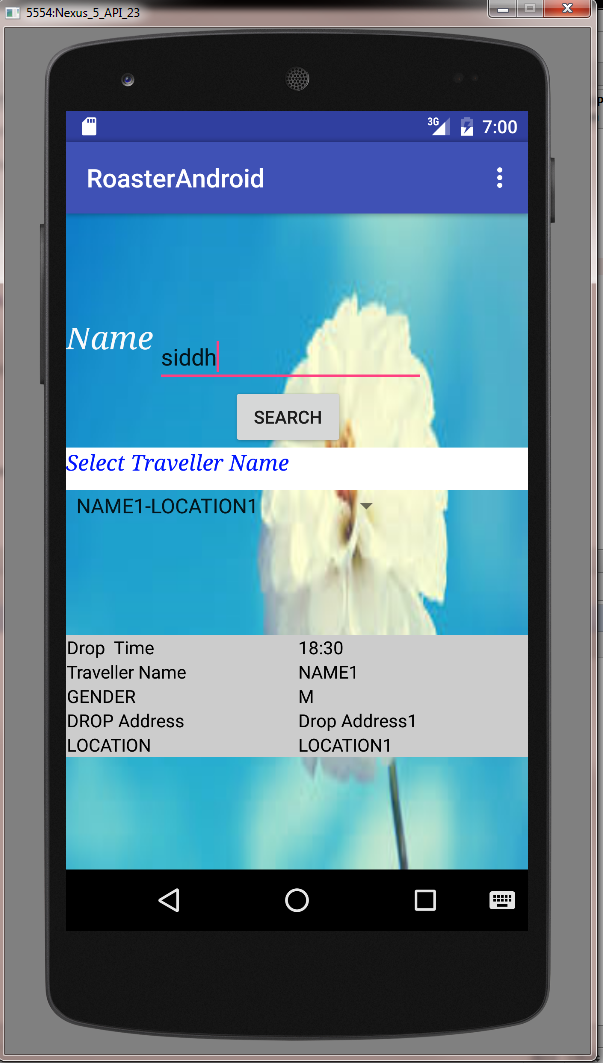
Android Application to Read Data from Web Service


1- Mainactivity
package raosterapplication.siddhu.roaster.com.roasterandroid;
import android.content.Intent;
import android.database.Cursor;
import android.os.Bundle;
import android.support.design.widget.FloatingActionButton;
import android.support.design.widget.Snackbar;
import android.support.v7.app.AppCompatActivity;
import android.support.v7.widget.Toolbar;
import android.view.View;
import android.view.Menu;
import android.view.MenuItem;
import android.widget.Button;
import android.widget.EditText;
import android.widget.Spinner;
import android.widget.TableLayout;
import android.widget.TextView;
import android.widget.Toast;
import android.os.AsyncTask;
import org.ksoap2.SoapEnvelope;
import org.ksoap2.serialization.SoapObject;
import org.ksoap2.serialization.SoapSerializationEnvelope;
import org.ksoap2.transport.HttpTransportSE;
import android.graphics.Color;
import android.widget.AdapterView;
import android.widget.ArrayAdapter;
import android.widget.TableRow;
import android.widget.TableRow.LayoutParams;
import java.util.Vector;
public class MainActivity extends AppCompatActivity implements
AdapterView.OnItemSelectedListener{

TextView label1;
Button button2;
Spinner spinner2;
EditText userNameText1;
String searchName, travellerName, travellerLocation;
String soapResponse, soapTravellerResponse;
TableLayout travellerInfoDataTable;
String DROP_TIME="";
String NAME= "";
String GENDER= "";
String DROP_ADDRESS= "";
String LOCATION= "";
String CABNO= "";

private SoapObject[] userList;// = { "India", "USA", "China", "Japan", "Other", };
private String[] userListArray = {"Select Data.."};
private final String NAMESPACE = "http://main.siddhu.com";
private final String URL = "http://XXXX:YYYY/mockExposeWebServiceSoap11Binding?wsdl";
private final String SOAP_ACTION = "http://main.siddhu.com/getCabInformations";
private final String METHOD_NAME = "getCabInformations";
private final String CAB_METHOD_NAME = "getCabInfo";
@Override
protected void onCreate(Bundle savedInstanceState) {
super.onCreate(savedInstanceState);
setContentView(R.layout.activity_main);
Toolbar toolbar = (Toolbar) findViewById(R.id.toolbar);
setSupportActionBar(toolbar);
label1 = (TextView) findViewById(R.id.nameLabel1);
userNameText1= (EditText) findViewById(R.id.userNameText1);
button2 = (Button) findViewById(R.id.searchButton);
button2.setOnClickListener(new clicker());
}
//--------------------------------------------------
class clicker implements Button.OnClickListener
{
public void onClick(View v) {
if("".equals(userNameText1.getText().toString()))
{
Toast.makeText(getApplicationContext(), "Please Enter Name to Search", Toast.LENGTH_SHORT).show();
}else if(null != userNameText1.getText())
{
searchName = userNameText1.getText().toString();
travellerInfoDataTable = (TableLayout) findViewById(R.id.main_table);
travellerInfoDataTable.removeAllViews();
//Create instance for AsyncCallWS
AsyncCallWS task = new AsyncCallWS();
//Call execute
task.execute();

}
}
} //------------------------------------------------------

private class AsyncCallWS extends AsyncTask {
@Override
protected Void doInBackground(String... params) {
//Log.i(TAG, "doInBackground");
getSoapResponse(searchName);
return null;
}
@Override
protected void onPostExecute(Void result) {
//System.out.println("soapResponse >>>>>>>>>>>>>>>>>>>>>" + soapResponse);
if(null == soapResponse){
Toast.makeText(getApplicationContext(), "No User Found",Toast.LENGTH_SHORT).show();
}
else{
spinner2 = (Spinner) findViewById (R.id.spinner2);
spinner2.setOnItemSelectedListener(MainActivity.this);
ArrayAdapter adapterScrum = new ArrayAdapter(MainActivity.this,android.R.layout.simple_spinner_item, userListArray);
adapterScrum.setDropDownViewResource(android.R.layout.simple_spinner_dropdown_item);
spinner2.setAdapter(adapterScrum);
}
}
@Override
protected void onPreExecute() {
//Log.i(TAG, "onPreExecute");
Toast.makeText(getApplicationContext(), "Fetching Result...", Toast.LENGTH_SHORT).show();
}
@Override
protected void onProgressUpdate(Void... values) {
// Log.i(TAG, "onProgressUpdate");
}
}
public void getSoapResponse(String searchName) {
//Create request
SoapObject request = new SoapObject(NAMESPACE, METHOD_NAME);
request.addProperty("name",searchName);
//Add the property to request object
//Create envelope
SoapSerializationEnvelope envelope = new SoapSerializationEnvelope(
SoapEnvelope.VER11);
//Set output SOAP object
envelope.setOutputSoapObject(request);
//Create HTTP call object
HttpTransportSE androidHttpTransport = new HttpTransportSE(URL);
try {
//Invole web service
androidHttpTransport.call(SOAP_ACTION, envelope);
//Get the response

Vector result = (Vector)envelope.getResponse();
//scrumListArray = (String) result.toArray();
Object[] soapObject = result.toArray(new Object[result.size()]);
userList = new SoapObject[soapObject.length];
userListArray = new String[soapObject.length+1];
userListArray[0] = "Please Select Traveller Name";
for(int i=0;i{
userList[i] = (SoapObject)soapObject[i];
System.out.println("userList:" + userList[i]);
System.out.println("userList.tostring:" + userList[i].toString());
System.out.println("userList.tostring:" + userList[i].getProperty("NAME").toString()+ "-" + userList[i].getProperty("LOCATION").toString());
userListArray[i+1] = userList[i].getProperty("NAME").toString()+ "-" + userList[i].getProperty("LOCATION").toString();
System.out.println("userListArray:" + userListArray[i+1]);
System.out.println("userListArray.tostring:" + userListArray[i+1].toString());
}
//System.out.println("result:" + result);
soapResponse = result.toString();
} catch (Exception e) {
Toast.makeText(getApplicationContext(), "System Error Please try after some time !!!!!",Toast.LENGTH_SHORT).show();
e.printStackTrace();
}
}
@Override
public void onItemSelected(AdapterView arg0, View arg1, int position,long id) {
Toast.makeText(getApplicationContext(),userListArray[position] ,Toast.LENGTH_LONG).show();
if(!"Please Select Traveller Name".equalsIgnoreCase(userListArray[position]))
{
String[] inputStingArray = userListArray[position].split("-");
travellerName = inputStingArray[0];
travellerLocation = inputStingArray[1];

//Create instance for AsyncCallWS for Getting Sprint Task informations
travellerInfoDataTable = (TableLayout) findViewById(R.id.main_table);
travellerInfoDataTable.removeAllViews();
TableRow tr_head = new TableRow(this);
//tr_head.setId(20);
tr_head.setBackgroundColor(Color.GRAY);
tr_head.setLayoutParams(new LayoutParams(LayoutParams.FILL_PARENT, LayoutParams.WRAP_CONTENT));
TextView label_list_of_kpi = new TextView(this);
//label_date.setId(20);
label_list_of_kpi.setText("Name");
label_list_of_kpi.setTextColor(Color.BLUE);
label_list_of_kpi.setPadding(5, 5, 5, 5);
tr_head.addView(label_list_of_kpi);// add the column to the table row here
TextView label_actual_kpi_value = new TextView(this);
//label_weight_kg.setId(21);// define id that must be unique
label_actual_kpi_value.setText("Descriptions"); // set the text for the header
label_actual_kpi_value.setTextColor(Color.BLUE); // set the color
label_actual_kpi_value.setPadding(5, 5, 5, 5); // set the padding (if required)
tr_head.addView(label_actual_kpi_value); // add the column to the table row here
travellerInfoDataTable.addView(tr_head, new TableLayout.LayoutParams( LayoutParams.FILL_PARENT, LayoutParams.WRAP_CONTENT));
//Create instance for AsyncCallWS
if ((!"".equals(travellerName) && !"Select Data..".equals(travellerName)) && (!"".equals(travellerLocation) && !"Select Data..".equals(travellerLocation))) {
AsyncTravellerInfoCallWS travellerInformation = new AsyncTravellerInfoCallWS();
//Call execute
travellerInformation.execute();
travellerInfoDataTable = (TableLayout) findViewById(R.id.main_table);
travellerInfoDataTable.removeAllViews();
}
}

}
private class AsyncTravellerInfoCallWS extends AsyncTask {
@Override
protected Void doInBackground(String... params) {
//Log.i(TAG, "doInBackground");
getTravellerInfoSoapResponse(travellerName, travellerLocation);
return null;
}
@Override
protected void onPostExecute(Void result) {
//System.out.println("soapResponse >>>>>>>>>>>>>>>>>>>>>" + soapResponse);
if (null == soapTravellerResponse) {
Toast.makeText(getApplicationContext(), "No Record Found", Toast.LENGTH_SHORT).show();
} else {
//Fill details of information in Table
// Create the table row
TableRow tr = new TableRow(getApplicationContext());
tr.setBackgroundColor(Color.LTGRAY);
tr.setLayoutParams(new LayoutParams(LayoutParams.FILL_PARENT,LayoutParams.WRAP_CONTENT));
//Create two columns to add as table data
// Create a TextView to add date
TextView labelDropTime = new TextView(getApplicationContext());
labelDropTime.setText("Drop Time");
labelDropTime.setPadding(2, 0, 5, 0);
labelDropTime.setTextColor(Color.BLACK);
tr.addView(labelDropTime);
TextView labelactualDropTime = new TextView(getApplicationContext());
labelactualDropTime.setText(DROP_TIME);
labelactualDropTime.setTextColor(Color.BLACK);
tr.addView(labelactualDropTime);
travellerInfoDataTable.addView(tr, new TableLayout.LayoutParams(LayoutParams.FILL_PARENT, LayoutParams.WRAP_CONTENT));
TableRow trOne = new TableRow(getApplicationContext());
trOne.setBackgroundColor(Color.LTGRAY);
trOne.setLayoutParams(new LayoutParams(LayoutParams.FILL_PARENT, LayoutParams.WRAP_CONTENT));
TextView labelTravellerName = new TextView(getApplicationContext());
labelTravellerName.setText("Traveller Name");
labelTravellerName.setPadding(2, 0, 5, 0);
labelTravellerName.setTextColor(Color.BLACK);
trOne.addView(labelTravellerName);
TextView labelactualTravellerName = new TextView(getApplicationContext());
labelactualTravellerName.setText(NAME);
labelactualTravellerName.setTextColor(Color.BLACK);
trOne.addView(labelactualTravellerName);
travellerInfoDataTable.addView(trOne, new TableLayout.LayoutParams(LayoutParams.FILL_PARENT, LayoutParams.WRAP_CONTENT));

TableRow trTwo = new TableRow(getApplicationContext());
trTwo.setBackgroundColor(Color.LTGRAY);
trTwo.setLayoutParams(new LayoutParams(LayoutParams.FILL_PARENT, LayoutParams.WRAP_CONTENT));
TextView labelGender = new TextView(getApplicationContext());
labelGender.setText("GENDER");
labelGender.setPadding(2, 0, 5, 0);
labelGender.setTextColor(Color.BLACK);
trTwo.addView(labelGender);
TextView labelactualGender= new TextView(getApplicationContext());
labelactualGender.setText(GENDER);
labelactualGender.setTextColor(Color.BLACK);
trTwo.addView(labelactualGender);
travellerInfoDataTable.addView(trTwo, new TableLayout.LayoutParams(LayoutParams.FILL_PARENT, LayoutParams.WRAP_CONTENT));
TableRow trThree = new TableRow(getApplicationContext());
trThree.setBackgroundColor(Color.LTGRAY);
trThree.setLayoutParams(new LayoutParams(LayoutParams.FILL_PARENT, LayoutParams.WRAP_CONTENT));
TextView labelDropAddress = new TextView(getApplicationContext());
labelDropAddress.setText("DROP Address");
labelDropAddress.setPadding(2, 0, 5, 0);
labelDropAddress.setTextColor(Color.BLACK);
trThree.addView(labelDropAddress);
TextView labelactuallabelDropAddress= new TextView(getApplicationContext());
labelactuallabelDropAddress.setText(DROP_ADDRESS);
labelactuallabelDropAddress.setTextColor(Color.BLACK);
trThree.addView(labelactuallabelDropAddress);
travellerInfoDataTable.addView(trThree, new TableLayout.LayoutParams(LayoutParams.FILL_PARENT, LayoutParams.WRAP_CONTENT));

TableRow trSix = new TableRow(getApplicationContext());
trSix.setBackgroundColor(Color.LTGRAY);
trSix.setLayoutParams(new LayoutParams(LayoutParams.FILL_PARENT, LayoutParams.WRAP_CONTENT));
TextView labelLocation = new TextView(getApplicationContext());
labelLocation.setText("LOCATION");
labelLocation.setPadding(2, 0, 5, 0);
labelLocation.setTextColor(Color.BLACK);
trSix.addView(labelLocation);
TextView labelactualLocation= new TextView(getApplicationContext());
labelactualLocation.setText(LOCATION);
labelactualLocation.setTextColor(Color.BLACK);
trSix.addView(labelactualLocation);
// finally add this to the table row
travellerInfoDataTable.addView(trSix, new TableLayout.LayoutParams(LayoutParams.FILL_PARENT, LayoutParams.WRAP_CONTENT));
TableRow trSeven = new TableRow(getApplicationContext());
trSeven.setBackgroundColor(Color.LTGRAY);
trSeven.setLayoutParams(new LayoutParams(LayoutParams.FILL_PARENT, LayoutParams.WRAP_CONTENT));
TextView labelCabNo = new TextView(getApplicationContext());
labelCabNo.setText("CABNO");
labelCabNo.setPadding(2, 0, 5, 0);
labelCabNo.setTextColor(Color.BLACK);
trSeven.addView(labelCabNo);
TextView labelactualCabNo= new TextView(getApplicationContext());
labelactualCabNo.setText(CABNO);
labelactualCabNo.setTextColor(Color.BLACK);
trSeven.addView(labelactualCabNo);
// finally add this to the table row

}
}
@Override
protected void onPreExecute() {
//Log.i(TAG, "onPreExecute");
Toast.makeText(getApplicationContext(), "Fetching Traveller Record Please wait...", Toast.LENGTH_SHORT).show();
}
@Override
protected void onProgressUpdate(Void... values) {
// Log.i(TAG, "onProgressUpdate");
}
}
public void getTravellerInfoSoapResponse(String travellerName, String travellerLocation) {
//Create request
SoapObject request = new SoapObject(NAMESPACE, CAB_METHOD_NAME);
request.addProperty("name",travellerName);
request.addProperty("location",travellerLocation);
//Add the property to request object
//Create envelope
SoapSerializationEnvelope envelope = new SoapSerializationEnvelope(
SoapEnvelope.VER11);
//Set output SOAP object
envelope.setOutputSoapObject(request);
//Create HTTP call object
HttpTransportSE androidHttpTransport = new HttpTransportSE(URL);
try {
//Invole web service
androidHttpTransport.call(SOAP_ACTION, envelope);
//Get the response
SoapObject result = (SoapObject)envelope.getResponse();
System.out.println("result:" + result);

if(!result.getProperty("DROP_TIME").toString().equals("") || null != result.getProperty("DROP_TIME").toString())
{
DROP_TIME = result.getProperty("DROP_TIME").toString();
//Toast.makeText(getApplicationContext(), "Redirecting...",Toast.LENGTH_SHORT).show();
}
if(!result.getProperty("NAME").toString().equals("") || null != result.getProperty("NAME").toString())
{
NAME = result.getProperty("NAME").toString();
}
if(!result.getProperty("GENDER").toString().equals("") || null != result.getProperty("GENDER").toString())
{
GENDER = result.getProperty("GENDER").toString();
}
if(!result.getProperty("DROP_ADDRESSS").toString().equals("") || null != result.getProperty("DROP_ADDRESSS").toString())
{
DROP_ADDRESS = result.getProperty("DROP_ADDRESSS").toString();
}
if(!result.getProperty("LOCATION").toString().equals("") || null != result.getProperty("LOCATION").toString())
{
LOCATION = result.getProperty("LOCATION").toString();
}
if(!result.getProperty("CABNO").toString().equals("") || null != result.getProperty("CABNO").toString())
{
CABNO = result.getProperty("CABNO").toString();
}
soapTravellerResponse = result.toString();

} catch (Exception e) {
Toast.makeText(getApplicationContext(), "System Error Please try after some time !!!!!",Toast.LENGTH_SHORT).show();
e.printStackTrace();
}
}

@Override
public void onNothingSelected(AdapterView arg0) {
// TODO Auto-generated method stub
Toast.makeText(getApplicationContext(),"No Value selected" ,Toast.LENGTH_LONG).show();
}

@Override
public boolean onCreateOptionsMenu(Menu menu) {
// Inflate the menu; this adds items to the action bar if it is present.
getMenuInflater().inflate(R.menu.menu_main, menu);
return true;
}
@Override
public boolean onOptionsItemSelected(MenuItem item) {
// Handle action bar item clicks here. The action bar will
// automatically handle clicks on the Home/Up button, so long
// as you specify a parent activity in AndroidManifest.xml.
int id = item.getItemId();
//noinspection SimplifiableIfStatement
if (id == R.id.action_settings) {
return true;
}
return super.onOptionsItemSelected(item);
}
}

2- activity_main.xml

xmlns:app="http://schemas.android.com/apk/res-auto"
xmlns:tools="http://schemas.android.com/tools"
android:layout_width="match_parent"
android:layout_height="match_parent"
android:fitsSystemWindows="true"
tools:context="raosterapplication.siddhu.roaster.com.roasterandroid.MainActivity">
android:layout_width="match_parent"
android:layout_height="wrap_content"
android:theme="@style/AppTheme.AppBarOverlay">
android:id="@+id/toolbar"
android:layout_width="match_parent"
android:layout_height="?attr/actionBarSize"
android:background="?attr/colorPrimary"
app:popupTheme="@style/AppTheme.PopupOverlay" />


3- AndroidManifest.xml

package="raosterapplication.siddhu.roaster.com.roasterandroid">

android:allowBackup="true"
android:icon="@drawable/cab"
android:label="@string/app_name"
android:supportsRtl="true"
android:theme="@style/AppTheme">
android:name=".MainActivity"
android:label="@string/app_name"
android:theme="@style/AppTheme.NoActionBar">


4- content.xml

xmlns:app="http://schemas.android.com/apk/res-auto"
android:orientation="vertical"
android:layout_width="match_parent"
android:layout_height="match_parent"
android:weightSum="1">
android:layout_width="match_parent"
android:layout_height="match_parent"
android:layout_gravity="center_horizontal"
android:scrollbarAlwaysDrawVerticalTrack="true"
android:scrollIndicators="top|left|bottom|start|end|right"
android:background="@drawable/flower"
android:scrollbarStyle="outsideInset">
android:id="@+id/userNameText1"
android:layout_width="wrap_content"
android:layout_height="wrap_content"
android:ems="10"
android:inputType="textNoSuggestions"
android:clickable="false"
android:editable="true"
android:enabled="true"
android:layout_above="@+id/searchButton"
android:layout_toRightOf="@+id/nameLabel1"
android:layout_toEndOf="@+id/nameLabel1" />
android:layout_width="wrap_content"
android:layout_height="wrap_content"
android:id="@+id/spinner2"
android:fadeScrollbars="false"
android:visibility="visible"
android:layout_centerVertical="true"
android:layout_alignParentLeft="true"
android:layout_alignParentStart="true" />
android:id="@+id/textView8"
android:layout_width="210px"
android:layout_height="100px"
android:text="Select Traveller Name"
android:textSize="17sp"
android:typeface="serif"
android:textStyle="italic"
android:textColor="#0015ff"
android:layout_x="10px"
android:layout_y="82px"
android:theme="@style/AppTheme"
android:autoText="false"
android:background="#ffffff"
android:layout_above="@+id/spinner2"
android:layout_alignParentLeft="true"
android:layout_alignParentStart="true"
android:layout_alignParentRight="true"
android:layout_alignParentEnd="true" />

android:stretchColumns="0,1"
android:id="@+id/main_table" android:layout_weight="0.11" android:layout_height="wrap_content" android:layout_width="match_parent"
android:isScrollContainer="true"
android:minHeight="80dp"
android:orientation="vertical"
android:layout_below="@+id/spinner2"
android:layout_alignParentLeft="true"
android:layout_alignParentStart="true"
android:layout_marginTop="89dp">

Image_1Image_2