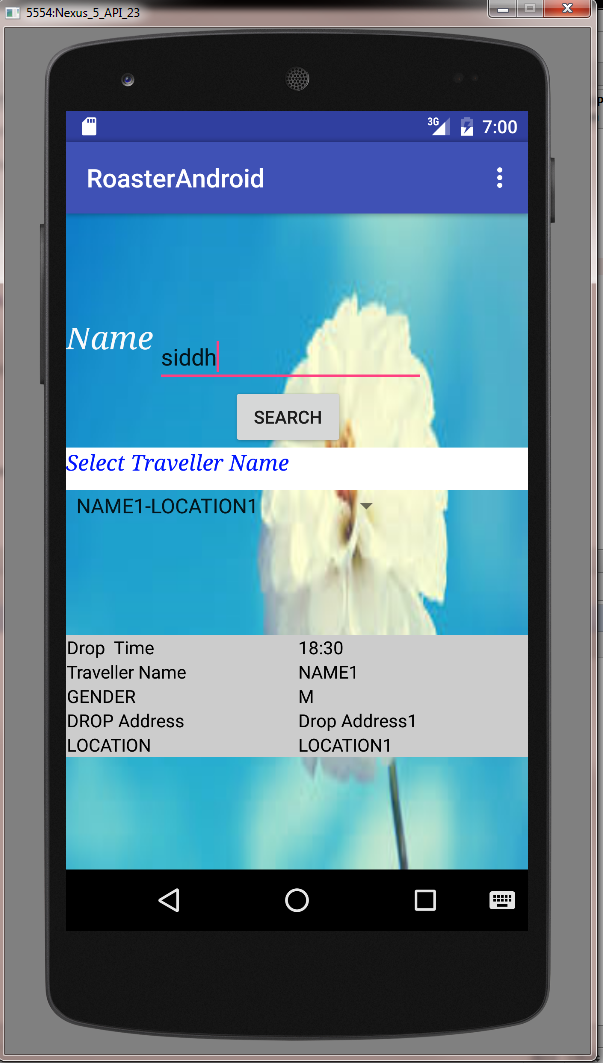
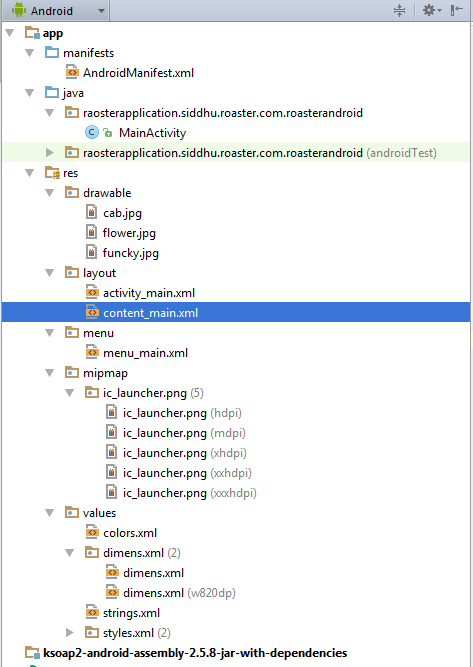
1- Mainactivity
package raosterapplication.siddhu.roaster.com.roasterandroid;
import android.content.Intent;
import android.database.Cursor;
import android.os.Bundle;
import android.support.design.widget.FloatingActionButton;
import android.support.design.widget.Snackbar;
import android.support.v7.app.AppCompatActivity;
import android.support.v7.widget.Toolbar;
import android.view.View;
import android.view.Menu;
import android.view.MenuItem;
import android.widget.Button;
import android.widget.EditText;
import android.widget.Spinner;
import android.widget.TableLayout;
import android.widget.TextView;
import android.widget.Toast;
import android.database.Cursor;
import android.os.Bundle;
import android.support.design.widget.FloatingActionButton;
import android.support.design.widget.Snackbar;
import android.support.v7.app.AppCompatActivity;
import android.support.v7.widget.Toolbar;
import android.view.View;
import android.view.Menu;
import android.view.MenuItem;
import android.widget.Button;
import android.widget.EditText;
import android.widget.Spinner;
import android.widget.TableLayout;
import android.widget.TextView;
import android.widget.Toast;
import android.os.AsyncTask;
import org.ksoap2.SoapEnvelope;
import org.ksoap2.serialization.SoapObject;
import org.ksoap2.serialization.SoapSerializationEnvelope;
import org.ksoap2.transport.HttpTransportSE;
import android.graphics.Color;
import android.widget.AdapterView;
import android.widget.ArrayAdapter;
import android.widget.TableRow;
import android.widget.TableRow.LayoutParams;
import java.util.Vector;
import org.ksoap2.SoapEnvelope;
import org.ksoap2.serialization.SoapObject;
import org.ksoap2.serialization.SoapSerializationEnvelope;
import org.ksoap2.transport.HttpTransportSE;
import android.graphics.Color;
import android.widget.AdapterView;
import android.widget.ArrayAdapter;
import android.widget.TableRow;
import android.widget.TableRow.LayoutParams;
import java.util.Vector;
public class MainActivity extends AppCompatActivity implements
AdapterView.OnItemSelectedListener{
AdapterView.OnItemSelectedListener{
TextView label1;
Button button2;
Spinner spinner2;
EditText userNameText1;
String searchName, travellerName, travellerLocation;
String soapResponse, soapTravellerResponse;
TableLayout travellerInfoDataTable;
TableLayout travellerInfoDataTable;
String DROP_TIME="";
String NAME= "";
String GENDER= "";
String DROP_ADDRESS= "";
String LOCATION= "";
String CABNO= "";
String NAME= "";
String GENDER= "";
String DROP_ADDRESS= "";
String LOCATION= "";
String CABNO= "";
private SoapObject[] userList;// = { "India", "USA", "China", "Japan", "Other", };
private String[] userListArray = {"Select Data.."};
private final String NAMESPACE = "http://main.siddhu.com";
private final String URL = "http://XXXX:YYYY/mockExposeWebServiceSoap11Binding?wsdl";
private final String SOAP_ACTION = "http://main.siddhu.com/getCabInformations";
private final String METHOD_NAME = "getCabInformations";
private final String CAB_METHOD_NAME = "getCabInfo";
@Override
protected void onCreate(Bundle savedInstanceState) {
super.onCreate(savedInstanceState);
setContentView(R.layout.activity_main);
Toolbar toolbar = (Toolbar) findViewById(R.id.toolbar);
setSupportActionBar(toolbar);
label1 = (TextView) findViewById(R.id.nameLabel1);
userNameText1= (EditText) findViewById(R.id.userNameText1);
button2 = (Button) findViewById(R.id.searchButton);
button2.setOnClickListener(new clicker());
private final String URL = "http://XXXX:YYYY/mockExposeWebServiceSoap11Binding?wsdl";
private final String SOAP_ACTION = "http://main.siddhu.com/getCabInformations";
private final String METHOD_NAME = "getCabInformations";
private final String CAB_METHOD_NAME = "getCabInfo";
@Override
protected void onCreate(Bundle savedInstanceState) {
super.onCreate(savedInstanceState);
setContentView(R.layout.activity_main);
Toolbar toolbar = (Toolbar) findViewById(R.id.toolbar);
setSupportActionBar(toolbar);
label1 = (TextView) findViewById(R.id.nameLabel1);
userNameText1= (EditText) findViewById(R.id.userNameText1);
button2 = (Button) findViewById(R.id.searchButton);
button2.setOnClickListener(new clicker());
}
//--------------------------------------------------
class clicker implements Button.OnClickListener
{
public void onClick(View v) {
class clicker implements Button.OnClickListener
{
public void onClick(View v) {
if("".equals(userNameText1.getText().toString()))
{
Toast.makeText(getApplicationContext(), "Please Enter Name to Search", Toast.LENGTH_SHORT).show();
}else if(null != userNameText1.getText())
{
{
Toast.makeText(getApplicationContext(), "Please Enter Name to Search", Toast.LENGTH_SHORT).show();
}else if(null != userNameText1.getText())
{
searchName = userNameText1.getText().toString();
travellerInfoDataTable = (TableLayout) findViewById(R.id.main_table);
travellerInfoDataTable.removeAllViews();
//Create instance for AsyncCallWS
AsyncCallWS task = new AsyncCallWS();
//Call execute
task.execute();
travellerInfoDataTable = (TableLayout) findViewById(R.id.main_table);
travellerInfoDataTable.removeAllViews();
//Create instance for AsyncCallWS
AsyncCallWS task = new AsyncCallWS();
//Call execute
task.execute();
}
}
} //------------------------------------------------------
} //------------------------------------------------------
private class AsyncCallWS extends AsyncTask
@Override
protected Void doInBackground(String... params) {
//Log.i(TAG, "doInBackground");
getSoapResponse(searchName);
return null;
}
@Override
protected void onPostExecute(Void result) {
protected void onPostExecute(Void result) {
//System.out.println("soapResponse >>>>>>>>>>>>>>>>>>>>>" + soapResponse);
if(null == soapResponse){
Toast.makeText(getApplicationContext(), "No User Found",Toast.LENGTH_SHORT).show();
if(null == soapResponse){
Toast.makeText(getApplicationContext(), "No User Found",Toast.LENGTH_SHORT).show();
}
else{
spinner2 = (Spinner) findViewById (R.id.spinner2);
spinner2.setOnItemSelectedListener(MainActivity.this);
ArrayAdapter adapterScrum = new ArrayAdapter(MainActivity.this,android.R.layout.simple_spinner_item, userListArray);
adapterScrum.setDropDownViewResource(android.R.layout.simple_spinner_dropdown_item);
spinner2.setAdapter(adapterScrum);
}
}
@Override
protected void onPreExecute() {
//Log.i(TAG, "onPreExecute");
Toast.makeText(getApplicationContext(), "Fetching Result...", Toast.LENGTH_SHORT).show();
}
else{
spinner2 = (Spinner) findViewById (R.id.spinner2);
spinner2.setOnItemSelectedListener(MainActivity.this);
ArrayAdapter
adapterScrum.setDropDownViewResource(android.R.layout.simple_spinner_dropdown_item);
spinner2.setAdapter(adapterScrum);
}
}
@Override
protected void onPreExecute() {
//Log.i(TAG, "onPreExecute");
Toast.makeText(getApplicationContext(), "Fetching Result...", Toast.LENGTH_SHORT).show();
}
@Override
protected void onProgressUpdate(Void... values) {
// Log.i(TAG, "onProgressUpdate");
}
protected void onProgressUpdate(Void... values) {
// Log.i(TAG, "onProgressUpdate");
}
}
public void getSoapResponse(String searchName) {
//Create request
SoapObject request = new SoapObject(NAMESPACE, METHOD_NAME);
SoapObject request = new SoapObject(NAMESPACE, METHOD_NAME);
request.addProperty("name",searchName);
//Add the property to request object
//Add the property to request object
//Create envelope
SoapSerializationEnvelope envelope = new SoapSerializationEnvelope(
SoapEnvelope.VER11);
//Set output SOAP object
envelope.setOutputSoapObject(request);
//Create HTTP call object
HttpTransportSE androidHttpTransport = new HttpTransportSE(URL);
SoapSerializationEnvelope envelope = new SoapSerializationEnvelope(
SoapEnvelope.VER11);
//Set output SOAP object
envelope.setOutputSoapObject(request);
//Create HTTP call object
HttpTransportSE androidHttpTransport = new HttpTransportSE(URL);
try {
//Invole web service
androidHttpTransport.call(SOAP_ACTION, envelope);
//Get the response
//Invole web service
androidHttpTransport.call(SOAP_ACTION, envelope);
//Get the response
Vector result = (Vector)envelope.getResponse();
//scrumListArray = (String) result.toArray();
Object[] soapObject = result.toArray(new Object[result.size()]);
userList = new SoapObject[soapObject.length];
userListArray = new String[soapObject.length+1];
userListArray[0] = "Please Select Traveller Name";
for(int i=0;i{
userList[i] = (SoapObject)soapObject[i];
System.out.println("userList:" + userList[i]);
System.out.println("userList.tostring:" + userList[i].toString());
System.out.println("userList.tostring:" + userList[i].getProperty("NAME").toString()+ "-" + userList[i].getProperty("LOCATION").toString());
userListArray[i+1] = userList[i].getProperty("NAME").toString()+ "-" + userList[i].getProperty("LOCATION").toString();
System.out.println("userListArray:" + userListArray[i+1]);
System.out.println("userListArray.tostring:" + userListArray[i+1].toString());
userList[i] = (SoapObject)soapObject[i];
System.out.println("userList:" + userList[i]);
System.out.println("userList.tostring:" + userList[i].toString());
System.out.println("userList.tostring:" + userList[i].getProperty("NAME").toString()+ "-" + userList[i].getProperty("LOCATION").toString());
userListArray[i+1] = userList[i].getProperty("NAME").toString()+ "-" + userList[i].getProperty("LOCATION").toString();
System.out.println("userListArray:" + userListArray[i+1]);
System.out.println("userListArray.tostring:" + userListArray[i+1].toString());
}
//System.out.println("result:" + result);
soapResponse = result.toString();
soapResponse = result.toString();
} catch (Exception e) {
Toast.makeText(getApplicationContext(), "System Error Please try after some time !!!!!",Toast.LENGTH_SHORT).show();
e.printStackTrace();
}
Toast.makeText(getApplicationContext(), "System Error Please try after some time !!!!!",Toast.LENGTH_SHORT).show();
e.printStackTrace();
}
}
@Override
public void onItemSelected(AdapterView arg0, View arg1, int position,long id) {
Toast.makeText(getApplicationContext(),userListArray[position] ,Toast.LENGTH_LONG).show();
if(!"Please Select Traveller Name".equalsIgnoreCase(userListArray[position]))
{
String[] inputStingArray = userListArray[position].split("-");
travellerName = inputStingArray[0];
travellerLocation = inputStingArray[1];
public void onItemSelected(AdapterView arg0, View arg1, int position,long id) {
Toast.makeText(getApplicationContext(),userListArray[position] ,Toast.LENGTH_LONG).show();
if(!"Please Select Traveller Name".equalsIgnoreCase(userListArray[position]))
{
String[] inputStingArray = userListArray[position].split("-");
travellerName = inputStingArray[0];
travellerLocation = inputStingArray[1];
//Create instance for AsyncCallWS for Getting Sprint Task informations
travellerInfoDataTable = (TableLayout) findViewById(R.id.main_table);
travellerInfoDataTable.removeAllViews();
TableRow tr_head = new TableRow(this);
//tr_head.setId(20);
tr_head.setBackgroundColor(Color.GRAY);
tr_head.setLayoutParams(new LayoutParams(LayoutParams.FILL_PARENT, LayoutParams.WRAP_CONTENT));
//tr_head.setId(20);
tr_head.setBackgroundColor(Color.GRAY);
tr_head.setLayoutParams(new LayoutParams(LayoutParams.FILL_PARENT, LayoutParams.WRAP_CONTENT));
TextView label_list_of_kpi = new TextView(this);
//label_date.setId(20);
label_list_of_kpi.setText("Name");
label_list_of_kpi.setTextColor(Color.BLUE);
label_list_of_kpi.setPadding(5, 5, 5, 5);
tr_head.addView(label_list_of_kpi);// add the column to the table row here
//label_date.setId(20);
label_list_of_kpi.setText("Name");
label_list_of_kpi.setTextColor(Color.BLUE);
label_list_of_kpi.setPadding(5, 5, 5, 5);
tr_head.addView(label_list_of_kpi);// add the column to the table row here
TextView label_actual_kpi_value = new TextView(this);
//label_weight_kg.setId(21);// define id that must be unique
label_actual_kpi_value.setText("Descriptions"); // set the text for the header
label_actual_kpi_value.setTextColor(Color.BLUE); // set the color
label_actual_kpi_value.setPadding(5, 5, 5, 5); // set the padding (if required)
tr_head.addView(label_actual_kpi_value); // add the column to the table row here
//label_weight_kg.setId(21);// define id that must be unique
label_actual_kpi_value.setText("Descriptions"); // set the text for the header
label_actual_kpi_value.setTextColor(Color.BLUE); // set the color
label_actual_kpi_value.setPadding(5, 5, 5, 5); // set the padding (if required)
tr_head.addView(label_actual_kpi_value); // add the column to the table row here
travellerInfoDataTable.addView(tr_head, new TableLayout.LayoutParams( LayoutParams.FILL_PARENT, LayoutParams.WRAP_CONTENT));
//Create instance for AsyncCallWS
if ((!"".equals(travellerName) && !"Select Data..".equals(travellerName)) && (!"".equals(travellerLocation) && !"Select Data..".equals(travellerLocation))) {
AsyncTravellerInfoCallWS travellerInformation = new AsyncTravellerInfoCallWS();
//Call execute
travellerInformation.execute();
travellerInfoDataTable = (TableLayout) findViewById(R.id.main_table);
travellerInfoDataTable.removeAllViews();
}
}
if ((!"".equals(travellerName) && !"Select Data..".equals(travellerName)) && (!"".equals(travellerLocation) && !"Select Data..".equals(travellerLocation))) {
AsyncTravellerInfoCallWS travellerInformation = new AsyncTravellerInfoCallWS();
//Call execute
travellerInformation.execute();
travellerInfoDataTable = (TableLayout) findViewById(R.id.main_table);
travellerInfoDataTable.removeAllViews();
}
}
}
private class AsyncTravellerInfoCallWS extends AsyncTask {
@Override
protected Void doInBackground(String... params) {
//Log.i(TAG, "doInBackground");
getTravellerInfoSoapResponse(travellerName, travellerLocation);
return null;
}
@Override
protected Void doInBackground(String... params) {
//Log.i(TAG, "doInBackground");
getTravellerInfoSoapResponse(travellerName, travellerLocation);
return null;
}
@Override
protected void onPostExecute(Void result) {
protected void onPostExecute(Void result) {
//System.out.println("soapResponse >>>>>>>>>>>>>>>>>>>>>" + soapResponse);
if (null == soapTravellerResponse) {
Toast.makeText(getApplicationContext(), "No Record Found", Toast.LENGTH_SHORT).show();
if (null == soapTravellerResponse) {
Toast.makeText(getApplicationContext(), "No Record Found", Toast.LENGTH_SHORT).show();
} else {
//Fill details of information in Table
//Fill details of information in Table
// Create the table row
TableRow tr = new TableRow(getApplicationContext());
tr.setBackgroundColor(Color.LTGRAY);
tr.setLayoutParams(new LayoutParams(LayoutParams.FILL_PARENT,LayoutParams.WRAP_CONTENT));
TableRow tr = new TableRow(getApplicationContext());
tr.setBackgroundColor(Color.LTGRAY);
tr.setLayoutParams(new LayoutParams(LayoutParams.FILL_PARENT,LayoutParams.WRAP_CONTENT));
//Create two columns to add as table data
// Create a TextView to add date
TextView labelDropTime = new TextView(getApplicationContext());
labelDropTime.setText("Drop Time");
labelDropTime.setPadding(2, 0, 5, 0);
labelDropTime.setTextColor(Color.BLACK);
tr.addView(labelDropTime);
// Create a TextView to add date
TextView labelDropTime = new TextView(getApplicationContext());
labelDropTime.setText("Drop Time");
labelDropTime.setPadding(2, 0, 5, 0);
labelDropTime.setTextColor(Color.BLACK);
tr.addView(labelDropTime);
TextView labelactualDropTime = new TextView(getApplicationContext());
labelactualDropTime.setText(DROP_TIME);
labelactualDropTime.setTextColor(Color.BLACK);
tr.addView(labelactualDropTime);
labelactualDropTime.setText(DROP_TIME);
labelactualDropTime.setTextColor(Color.BLACK);
tr.addView(labelactualDropTime);
travellerInfoDataTable.addView(tr, new TableLayout.LayoutParams(LayoutParams.FILL_PARENT, LayoutParams.WRAP_CONTENT));
TableRow trOne = new TableRow(getApplicationContext());
trOne.setBackgroundColor(Color.LTGRAY);
trOne.setLayoutParams(new LayoutParams(LayoutParams.FILL_PARENT, LayoutParams.WRAP_CONTENT));
trOne.setBackgroundColor(Color.LTGRAY);
trOne.setLayoutParams(new LayoutParams(LayoutParams.FILL_PARENT, LayoutParams.WRAP_CONTENT));
TextView labelTravellerName = new TextView(getApplicationContext());
labelTravellerName.setText("Traveller Name");
labelTravellerName.setPadding(2, 0, 5, 0);
labelTravellerName.setTextColor(Color.BLACK);
trOne.addView(labelTravellerName);
labelTravellerName.setText("Traveller Name");
labelTravellerName.setPadding(2, 0, 5, 0);
labelTravellerName.setTextColor(Color.BLACK);
trOne.addView(labelTravellerName);
TextView labelactualTravellerName = new TextView(getApplicationContext());
labelactualTravellerName.setText(NAME);
labelactualTravellerName.setTextColor(Color.BLACK);
trOne.addView(labelactualTravellerName);
travellerInfoDataTable.addView(trOne, new TableLayout.LayoutParams(LayoutParams.FILL_PARENT, LayoutParams.WRAP_CONTENT));
labelactualTravellerName.setText(NAME);
labelactualTravellerName.setTextColor(Color.BLACK);
trOne.addView(labelactualTravellerName);
travellerInfoDataTable.addView(trOne, new TableLayout.LayoutParams(LayoutParams.FILL_PARENT, LayoutParams.WRAP_CONTENT));
TableRow trTwo = new TableRow(getApplicationContext());
trTwo.setBackgroundColor(Color.LTGRAY);
trTwo.setLayoutParams(new LayoutParams(LayoutParams.FILL_PARENT, LayoutParams.WRAP_CONTENT));
TextView labelGender = new TextView(getApplicationContext());
labelGender.setText("GENDER");
labelGender.setPadding(2, 0, 5, 0);
labelGender.setTextColor(Color.BLACK);
trTwo.addView(labelGender);
labelGender.setText("GENDER");
labelGender.setPadding(2, 0, 5, 0);
labelGender.setTextColor(Color.BLACK);
trTwo.addView(labelGender);
TextView labelactualGender= new TextView(getApplicationContext());
labelactualGender.setText(GENDER);
labelactualGender.setTextColor(Color.BLACK);
trTwo.addView(labelactualGender);
travellerInfoDataTable.addView(trTwo, new TableLayout.LayoutParams(LayoutParams.FILL_PARENT, LayoutParams.WRAP_CONTENT));
labelactualGender.setText(GENDER);
labelactualGender.setTextColor(Color.BLACK);
trTwo.addView(labelactualGender);
travellerInfoDataTable.addView(trTwo, new TableLayout.LayoutParams(LayoutParams.FILL_PARENT, LayoutParams.WRAP_CONTENT));
TableRow trThree = new TableRow(getApplicationContext());
trThree.setBackgroundColor(Color.LTGRAY);
trThree.setLayoutParams(new LayoutParams(LayoutParams.FILL_PARENT, LayoutParams.WRAP_CONTENT));
trThree.setBackgroundColor(Color.LTGRAY);
trThree.setLayoutParams(new LayoutParams(LayoutParams.FILL_PARENT, LayoutParams.WRAP_CONTENT));
TextView labelDropAddress = new TextView(getApplicationContext());
labelDropAddress.setText("DROP Address");
labelDropAddress.setPadding(2, 0, 5, 0);
labelDropAddress.setTextColor(Color.BLACK);
trThree.addView(labelDropAddress);
labelDropAddress.setText("DROP Address");
labelDropAddress.setPadding(2, 0, 5, 0);
labelDropAddress.setTextColor(Color.BLACK);
trThree.addView(labelDropAddress);
TextView labelactuallabelDropAddress= new TextView(getApplicationContext());
labelactuallabelDropAddress.setText(DROP_ADDRESS);
labelactuallabelDropAddress.setTextColor(Color.BLACK);
trThree.addView(labelactuallabelDropAddress);
travellerInfoDataTable.addView(trThree, new TableLayout.LayoutParams(LayoutParams.FILL_PARENT, LayoutParams.WRAP_CONTENT));
labelactuallabelDropAddress.setText(DROP_ADDRESS);
labelactuallabelDropAddress.setTextColor(Color.BLACK);
trThree.addView(labelactuallabelDropAddress);
travellerInfoDataTable.addView(trThree, new TableLayout.LayoutParams(LayoutParams.FILL_PARENT, LayoutParams.WRAP_CONTENT));
TableRow trSix = new TableRow(getApplicationContext());
trSix.setBackgroundColor(Color.LTGRAY);
trSix.setLayoutParams(new LayoutParams(LayoutParams.FILL_PARENT, LayoutParams.WRAP_CONTENT));
TextView labelLocation = new TextView(getApplicationContext());
labelLocation.setText("LOCATION");
labelLocation.setPadding(2, 0, 5, 0);
labelLocation.setTextColor(Color.BLACK);
trSix.addView(labelLocation);
labelLocation.setText("LOCATION");
labelLocation.setPadding(2, 0, 5, 0);
labelLocation.setTextColor(Color.BLACK);
trSix.addView(labelLocation);
TextView labelactualLocation= new TextView(getApplicationContext());
labelactualLocation.setText(LOCATION);
labelactualLocation.setTextColor(Color.BLACK);
trSix.addView(labelactualLocation);
// finally add this to the table row
labelactualLocation.setText(LOCATION);
labelactualLocation.setTextColor(Color.BLACK);
trSix.addView(labelactualLocation);
// finally add this to the table row
travellerInfoDataTable.addView(trSix, new TableLayout.LayoutParams(LayoutParams.FILL_PARENT, LayoutParams.WRAP_CONTENT));
TableRow trSeven = new TableRow(getApplicationContext());
trSeven.setBackgroundColor(Color.LTGRAY);
trSeven.setLayoutParams(new LayoutParams(LayoutParams.FILL_PARENT, LayoutParams.WRAP_CONTENT));
trSeven.setBackgroundColor(Color.LTGRAY);
trSeven.setLayoutParams(new LayoutParams(LayoutParams.FILL_PARENT, LayoutParams.WRAP_CONTENT));
TextView labelCabNo = new TextView(getApplicationContext());
labelCabNo.setText("CABNO");
labelCabNo.setPadding(2, 0, 5, 0);
labelCabNo.setTextColor(Color.BLACK);
trSeven.addView(labelCabNo);
labelCabNo.setText("CABNO");
labelCabNo.setPadding(2, 0, 5, 0);
labelCabNo.setTextColor(Color.BLACK);
trSeven.addView(labelCabNo);
TextView labelactualCabNo= new TextView(getApplicationContext());
labelactualCabNo.setText(CABNO);
labelactualCabNo.setTextColor(Color.BLACK);
trSeven.addView(labelactualCabNo);
// finally add this to the table row
labelactualCabNo.setText(CABNO);
labelactualCabNo.setTextColor(Color.BLACK);
trSeven.addView(labelactualCabNo);
// finally add this to the table row
}
}
@Override
protected void onPreExecute() {
//Log.i(TAG, "onPreExecute");
Toast.makeText(getApplicationContext(), "Fetching Traveller Record Please wait...", Toast.LENGTH_SHORT).show();
}
protected void onPreExecute() {
//Log.i(TAG, "onPreExecute");
Toast.makeText(getApplicationContext(), "Fetching Traveller Record Please wait...", Toast.LENGTH_SHORT).show();
}
@Override
protected void onProgressUpdate(Void... values) {
// Log.i(TAG, "onProgressUpdate");
}
}
protected void onProgressUpdate(Void... values) {
// Log.i(TAG, "onProgressUpdate");
}
}
public void getTravellerInfoSoapResponse(String travellerName, String travellerLocation) {
//Create request
SoapObject request = new SoapObject(NAMESPACE, CAB_METHOD_NAME);
SoapObject request = new SoapObject(NAMESPACE, CAB_METHOD_NAME);
request.addProperty("name",travellerName);
request.addProperty("location",travellerLocation);
//Add the property to request object
request.addProperty("location",travellerLocation);
//Add the property to request object
//Create envelope
SoapSerializationEnvelope envelope = new SoapSerializationEnvelope(
SoapEnvelope.VER11);
//Set output SOAP object
envelope.setOutputSoapObject(request);
//Create HTTP call object
HttpTransportSE androidHttpTransport = new HttpTransportSE(URL);
SoapSerializationEnvelope envelope = new SoapSerializationEnvelope(
SoapEnvelope.VER11);
//Set output SOAP object
envelope.setOutputSoapObject(request);
//Create HTTP call object
HttpTransportSE androidHttpTransport = new HttpTransportSE(URL);
try {
//Invole web service
androidHttpTransport.call(SOAP_ACTION, envelope);
//Get the response
//Invole web service
androidHttpTransport.call(SOAP_ACTION, envelope);
//Get the response
SoapObject result = (SoapObject)envelope.getResponse();
System.out.println("result:" + result);
if(!result.getProperty("DROP_TIME").toString().equals("") || null != result.getProperty("DROP_TIME").toString())
{
DROP_TIME = result.getProperty("DROP_TIME").toString();
//Toast.makeText(getApplicationContext(), "Redirecting...",Toast.LENGTH_SHORT).show();
}
if(!result.getProperty("NAME").toString().equals("") || null != result.getProperty("NAME").toString())
{
NAME = result.getProperty("NAME").toString();
}
if(!result.getProperty("GENDER").toString().equals("") || null != result.getProperty("GENDER").toString())
{
GENDER = result.getProperty("GENDER").toString();
}
if(!result.getProperty("DROP_ADDRESSS").toString().equals("") || null != result.getProperty("DROP_ADDRESSS").toString())
{
DROP_ADDRESS = result.getProperty("DROP_ADDRESSS").toString();
}
}
if(!result.getProperty("NAME").toString().equals("") || null != result.getProperty("NAME").toString())
{
NAME = result.getProperty("NAME").toString();
}
if(!result.getProperty("GENDER").toString().equals("") || null != result.getProperty("GENDER").toString())
{
GENDER = result.getProperty("GENDER").toString();
}
if(!result.getProperty("DROP_ADDRESSS").toString().equals("") || null != result.getProperty("DROP_ADDRESSS").toString())
{
DROP_ADDRESS = result.getProperty("DROP_ADDRESSS").toString();
}
if(!result.getProperty("LOCATION").toString().equals("") || null != result.getProperty("LOCATION").toString())
{
LOCATION = result.getProperty("LOCATION").toString();
}
{
LOCATION = result.getProperty("LOCATION").toString();
}
if(!result.getProperty("CABNO").toString().equals("") || null != result.getProperty("CABNO").toString())
{
CABNO = result.getProperty("CABNO").toString();
}
{
CABNO = result.getProperty("CABNO").toString();
}
soapTravellerResponse = result.toString();
} catch (Exception e) {
Toast.makeText(getApplicationContext(), "System Error Please try after some time !!!!!",Toast.LENGTH_SHORT).show();
e.printStackTrace();
}
}
@Override
public void onNothingSelected(AdapterView arg0) {
// TODO Auto-generated method stub
Toast.makeText(getApplicationContext(),"No Value selected" ,Toast.LENGTH_LONG).show();
}
@Override
public boolean onCreateOptionsMenu(Menu menu) {
// Inflate the menu; this adds items to the action bar if it is present.
getMenuInflater().inflate(R.menu.menu_main, menu);
return true;
}
@Override
public boolean onOptionsItemSelected(MenuItem item) {
// Handle action bar item clicks here. The action bar will
// automatically handle clicks on the Home/Up button, so long
// as you specify a parent activity in AndroidManifest.xml.
int id = item.getItemId();
public boolean onOptionsItemSelected(MenuItem item) {
// Handle action bar item clicks here. The action bar will
// automatically handle clicks on the Home/Up button, so long
// as you specify a parent activity in AndroidManifest.xml.
int id = item.getItemId();
//noinspection SimplifiableIfStatement
if (id == R.id.action_settings) {
return true;
}
if (id == R.id.action_settings) {
return true;
}
return super.onOptionsItemSelected(item);
}
}
}
}
2- activity_main.xml
xmlns:tools="http://schemas.android.com/tools"
android:layout_width="match_parent"
android:layout_height="match_parent"
android:fitsSystemWindows="true"
tools:context="raosterapplication.siddhu.roaster.com.roasterandroid.MainActivity">
android:layout_height="wrap_content"
android:theme="@style/AppTheme.AppBarOverlay">
android:layout_width="match_parent"
android:layout_height="?attr/actionBarSize"
android:background="?attr/colorPrimary"
app:popupTheme="@style/AppTheme.PopupOverlay" />
3- AndroidManifest.xml
android:icon="@drawable/cab"
android:label="@string/app_name"
android:supportsRtl="true"
android:theme="@style/AppTheme">
android:label="@string/app_name"
android:theme="@style/AppTheme.NoActionBar">
4- content.xml
android:orientation="vertical"
android:layout_width="match_parent"
android:layout_height="match_parent"
android:weightSum="1">
android:layout_height="match_parent"
android:layout_gravity="center_horizontal"
android:scrollbarAlwaysDrawVerticalTrack="true"
android:scrollIndicators="top|left|bottom|start|end|right"
android:background="@drawable/flower"
android:scrollbarStyle="outsideInset">
android:layout_width="wrap_content"
android:layout_height="wrap_content"
android:ems="10"
android:inputType="textNoSuggestions"
android:clickable="false"
android:editable="true"
android:enabled="true"
android:layout_above="@+id/searchButton"
android:layout_toRightOf="@+id/nameLabel1"
android:layout_toEndOf="@+id/nameLabel1" />
android:layout_height="wrap_content"
android:id="@+id/spinner2"
android:fadeScrollbars="false"
android:visibility="visible"
android:layout_centerVertical="true"
android:layout_alignParentLeft="true"
android:layout_alignParentStart="true" />
android:layout_width="210px"
android:layout_height="100px"
android:text="Select Traveller Name"
android:textSize="17sp"
android:typeface="serif"
android:textStyle="italic"
android:textColor="#0015ff"
android:layout_x="10px"
android:layout_y="82px"
android:theme="@style/AppTheme"
android:autoText="false"
android:background="#ffffff"
android:layout_above="@+id/spinner2"
android:layout_alignParentLeft="true"
android:layout_alignParentStart="true"
android:layout_alignParentRight="true"
android:layout_alignParentEnd="true" />
android:id="@+id/main_table" android:layout_weight="0.11" android:layout_height="wrap_content" android:layout_width="match_parent"
android:isScrollContainer="true"
android:minHeight="80dp"
android:orientation="vertical"
android:layout_below="@+id/spinner2"
android:layout_alignParentLeft="true"
android:layout_alignParentStart="true"
android:layout_marginTop="89dp">