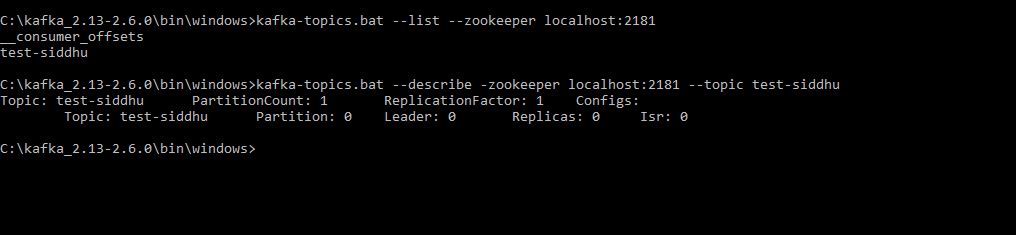
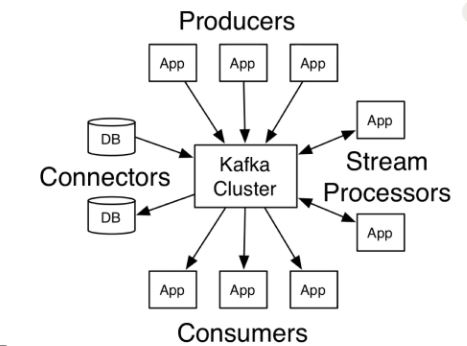
In general practise we dont use CLI to send data and to receive data. We use language that belongs to our project for performing this operation. Any way CLI tool is good to do daily routeing like log check, health status, current load etc.
In the below example we will try to send the message/data and consume it using java producer and client. We are going to use the Maven build for the same.
Follow the below step to create the create a maven project in eclipse IDE. you can use IDE that suites you.
Step 1- Create a maven project and update your pom.xml with following dependencies.
First we will create a simple java producer application that will insert data into our topic
We will create a constant file that will store the constant value that we are going to use in our project.
Lets create few of differet Producer that will insert data into our topic
1:- SimpleProducer
1 2 3 4 5 6 7 8 9 10 11 12 13 14 15 16 17 18 19 20 21 22 23 24 25 26 27 28 29 30 31 32 33 34 35 36 37 38 39 40 41 42 43 44 45 46 47 48 49 50 51 52 53 54 55 56 57 58 59 60 61 62 | /** * */package com.siddhu.kafka.example.siddhukafkaexample.simpleproducer;import java.util.Properties;import org.apache.kafka.clients.producer.KafkaProducer;import org.apache.kafka.clients.producer.ProducerConfig;import org.apache.kafka.clients.producer.ProducerRecord;import org.apache.kafka.common.serialization.IntegerSerializer;import org.apache.kafka.common.serialization.StringSerializer;import org.slf4j.Logger;import org.slf4j.LoggerFactory;/** * * @author Siddhartha * */public class SimpleProducer { Logger logger = LoggerFactory.getLogger(SimpleProducer.class.getName()); /** * @param args */ public static void main(String[] args) { new SimpleProducer().run(); } public void run(){ // TODO Auto-generated method stub logger.info("Kafka Producer start..."); Properties props = new Properties(); props.put(ProducerConfig.CLIENT_ID_CONFIG, AppConfigs.applicationID); props.put(ProducerConfig.BOOTSTRAP_SERVERS_CONFIG, AppConfigs.bootstrapServers); props.put(ProducerConfig.KEY_SERIALIZER_CLASS_CONFIG, IntegerSerializer.class.getName()); props.put(ProducerConfig.VALUE_SERIALIZER_CLASS_CONFIG, StringSerializer.class.getName()); KafkaProducer<Integer, String> producer = new KafkaProducer<Integer, String>(props); logger.info("Sending messages..."); for (int i = 1; i <= AppConfigs.numEvents; i++) { producer.send(new ProducerRecord<Integer, String>(AppConfigs.topicName, i, "Simple Message-" + i)); } logger.info("Finished message sending- Closing Kafka Producer."); // add a shutdown hook Runtime.getRuntime().addShutdownHook(new Thread(() -> { logger.info("stopping application..."); // flush data producer.flush(); logger.info("closing producer..."); producer.close(); logger.info("done!"); })); //producer.close(); }} |
here we just are inserting data with message Simple Message- increment in topic.
2-SiddhuSimpleProducer
1 2 3 4 5 6 7 8 9 10 11 12 13 14 15 16 17 18 19 20 21 22 23 24 25 26 27 28 29 30 31 32 33 34 35 36 37 38 39 40 41 42 43 44 45 46 47 48 49 50 51 52 53 54 55 56 57 58 59 60 61 62 63 64 65 66 67 68 69 70 71 72 73 | package com.siddhu.kafka.example.siddhukafkaexample.simpleproducer;import java.util.Properties;import org.apache.kafka.clients.producer.KafkaProducer;import org.apache.kafka.clients.producer.ProducerConfig;import org.apache.kafka.clients.producer.ProducerRecord;import org.apache.kafka.common.serialization.IntegerSerializer;import org.apache.kafka.common.serialization.StringSerializer;import org.slf4j.Logger;import org.slf4j.LoggerFactory;public class SiddhuSimpleProducer { Logger logger = LoggerFactory.getLogger(SiddhuSimpleProducer.class.getName()); public SiddhuSimpleProducer(){} public static void main(String[] args) { new SiddhuSimpleProducer().run(); } public void run(){ logger.info("Setup"); // create a kafka producer KafkaProducer<Integer, String> producer = createKafkaProducer(); // add a shutdown hook Runtime.getRuntime().addShutdownHook(new Thread(() -> { logger.info("stopping application..."); // flush data producer.flush(); producer.close(); logger.info("done!"); })); // loop to send tweets to kafka logger.info("Sending messages..."); for (int i = 1; i <= AppConfigs.numEvents; i++) { producer.send(new ProducerRecord<Integer, String>(AppConfigs.topicName, i, "Siddhu Simple Producer Message-" + i)); } logger.info("End of application"); } public KafkaProducer<Integer, String> createKafkaProducer(){ //String bootstrapServers = "127.0.0.1:9092"; // create Producer properties Properties properties = new Properties(); properties.setProperty(ProducerConfig.BOOTSTRAP_SERVERS_CONFIG, AppConfigs.bootstrapServers); properties.setProperty(ProducerConfig.KEY_SERIALIZER_CLASS_CONFIG, IntegerSerializer.class.getName()); properties.setProperty(ProducerConfig.VALUE_SERIALIZER_CLASS_CONFIG, StringSerializer.class.getName()); // create safe Producer properties.setProperty(ProducerConfig.ENABLE_IDEMPOTENCE_CONFIG, "true"); properties.setProperty(ProducerConfig.ACKS_CONFIG, "all"); properties.setProperty(ProducerConfig.RETRIES_CONFIG, Integer.toString(Integer.MAX_VALUE)); properties.setProperty(ProducerConfig.MAX_IN_FLIGHT_REQUESTS_PER_CONNECTION, "5"); // kafka 2.0 >= 1.1 so we can keep this as 5. Use 1 otherwise. // high throughput producer (at the expense of a bit of latency and CPU usage) properties.setProperty(ProducerConfig.COMPRESSION_TYPE_CONFIG, "snappy"); properties.setProperty(ProducerConfig.LINGER_MS_CONFIG, "20"); properties.setProperty(ProducerConfig.BATCH_SIZE_CONFIG, Integer.toString(32*1024)); // 32 KB batch size // create the producer KafkaProducer<Integer, String> producer = new KafkaProducer<Integer, String>(properties); return producer; }} |
Here we are using proper shutdown hook to close the application along with some of the concept like safe producer and high throughput.
3- SiddhuSimpleProducerWithCallBack
1 2 3 4 5 6 7 8 9 10 11 12 13 14 15 16 17 18 19 20 21 22 23 24 25 26 27 28 29 30 31 32 33 34 35 36 37 38 39 40 41 42 43 44 45 46 47 48 49 50 51 52 53 54 55 56 57 58 59 60 61 62 63 64 65 66 67 68 69 70 71 72 73 74 75 76 77 78 79 80 81 82 83 84 85 86 87 88 89 90 91 92 93 94 95 96 97 98 99 100 101 102 103 104 105 106 107 108 109 110 111 112 113 114 115 116 117 118 119 120 121 122 123 124 125 126 127 128 129 130 131 | package com.siddhu.kafka.example.siddhukafkaexample.simpleproducer;import java.util.Properties;import java.util.concurrent.ExecutionException;import org.apache.kafka.clients.producer.Callback;import org.apache.kafka.clients.producer.KafkaProducer;import org.apache.kafka.clients.producer.ProducerConfig;import org.apache.kafka.clients.producer.ProducerRecord;import org.apache.kafka.clients.producer.RecordMetadata;import org.apache.kafka.common.serialization.IntegerSerializer;import org.apache.kafka.common.serialization.StringSerializer;import org.slf4j.Logger;import org.slf4j.LoggerFactory;public class SiddhuSimpleProducerWithCallBack { Logger logger = LoggerFactory.getLogger(SiddhuSimpleProducerWithCallBack.class.getName()); public SiddhuSimpleProducerWithCallBack(){} public static void main(String[] args) { new SiddhuSimpleProducerWithCallBack().run(); } public void run(){ logger.info("Setup"); // create a kafka producer KafkaProducer<Integer, String> producer = createKafkaProducer(); // add a shutdown hook Runtime.getRuntime().addShutdownHook(new Thread(() -> { logger.info("stopping application..."); // flush data producer.flush(); producer.close(); logger.info("done!"); })); // loop to send tweets to kafka logger.info("Sending messages..."); /* * for (int i = 1; i <= AppConfigs.numEvents; i++) { producer.send(new * ProducerRecord<Integer, String>(AppConfigs.topicName, i, * "Siddhu Simple Producer Message-" + i)); } */ for (int i=0; i<20; i++ ) { // create a producer record ProducerRecord<Integer, String> record = new ProducerRecord<Integer, String>(AppConfigs.topicName, i , "Siddhu different key Simple Producer with callback Message -" + i); // send data - asynchronous producer.send(record, new Callback() { public void onCompletion(RecordMetadata recordMetadata, Exception e) { // executes every time a record is successfully sent or an exception is thrown if (e == null) { // the record was successfully sent logger.info("Received new metadata. \n" + "Topic:" + recordMetadata.topic() + "\n" + "Partition: " + recordMetadata.partition() + "\n" + "Offset: " + recordMetadata.offset() + "\n" + "Timestamp: " + recordMetadata.timestamp()); } else { logger.error("Error while producing", e); } } }); /* try { for (int i=0; i<20; i++ ) { // create a producer record ProducerRecord<Integer, String> record = new ProducerRecord<Integer, String>(AppConfigs.topicName, "Siddhu Sync Simple Producer with callback Message -" + i); // send data - asynchronous producer.send(record, new Callback() { public void onCompletion(RecordMetadata recordMetadata, Exception e) { // executes every time a record is successfully sent or an exception is thrown if (e == null) { // the record was successfully sent logger.info("Received new metadata. \n" + "Topic:" + recordMetadata.topic() + "\n" + "Partition: " + recordMetadata.partition() + "\n" + "Offset: " + recordMetadata.offset() + "\n" + "Timestamp: " + recordMetadata.timestamp()); } else { logger.error("Error while producing", e); } } }).get(); // block the .send() to make it synchronous - don't do this in production! } } catch (InterruptedException e) { // TODO Auto-generated catch block e.printStackTrace(); } catch (ExecutionException e) { // TODO Auto-generated catch block e.printStackTrace(); }*/ logger.info("End of application"); } } public KafkaProducer<Integer, String> createKafkaProducer(){ //String bootstrapServers = "127.0.0.1:9092"; // create Producer properties Properties properties = new Properties(); properties.setProperty(ProducerConfig.BOOTSTRAP_SERVERS_CONFIG, AppConfigs.bootstrapServers); properties.setProperty(ProducerConfig.KEY_SERIALIZER_CLASS_CONFIG, IntegerSerializer.class.getName()); properties.setProperty(ProducerConfig.VALUE_SERIALIZER_CLASS_CONFIG, StringSerializer.class.getName()); // create safe Producer properties.setProperty(ProducerConfig.ENABLE_IDEMPOTENCE_CONFIG, "true"); properties.setProperty(ProducerConfig.ACKS_CONFIG, "all"); properties.setProperty(ProducerConfig.RETRIES_CONFIG, Integer.toString(Integer.MAX_VALUE)); properties.setProperty(ProducerConfig.MAX_IN_FLIGHT_REQUESTS_PER_CONNECTION, "5"); // kafka 2.0 >= 1.1 so we can keep this as 5. Use 1 otherwise. // high throughput producer (at the expense of a bit of latency and CPU usage) properties.setProperty(ProducerConfig.COMPRESSION_TYPE_CONFIG, "snappy"); properties.setProperty(ProducerConfig.LINGER_MS_CONFIG, "20"); properties.setProperty(ProducerConfig.BATCH_SIZE_CONFIG, Integer.toString(32*1024)); // 32 KB batch size // create the producer KafkaProducer<Integer, String> producer = new KafkaProducer<Integer, String>(properties); return producer; }} |
Here we are sending the message async in nature by implementing Callback. Also if you want this to be sync just add .get() for send() method and we are done with it.
4- Multithreading example SiddhuKafkaThreadProducer.
1 2 3 4 5 6 7 8 9 10 11 12 13 14 15 16 17 18 19 20 21 22 23 24 25 26 27 28 29 30 31 32 33 34 35 36 37 38 39 40 41 42 43 44 45 46 47 48 49 50 51 52 53 54 55 56 57 58 59 60 61 62 63 64 65 66 67 68 69 70 71 72 73 74 75 76 77 78 79 80 81 82 | package com.siddhu.kafka.example.siddhukafkaexample.simpleproducer;import java.io.File;import java.io.FileInputStream;import java.io.FileNotFoundException;import java.io.IOException;import java.io.InputStream;import java.util.Properties;import java.util.Scanner;import org.apache.kafka.clients.producer.KafkaProducer;import org.apache.kafka.clients.producer.ProducerConfig;import org.apache.kafka.clients.producer.ProducerRecord;import org.apache.kafka.common.serialization.IntegerSerializer;import org.apache.kafka.common.serialization.StringSerializer;import org.slf4j.Logger;import org.slf4j.LoggerFactory;public class SiddhuKafkaThreadProducer implements Runnable{ private static Logger logger = LoggerFactory.getLogger(SiddhuKafkaThreadProducer.class.getName()); private String fileLocation; private String topicName; private KafkaProducer<Integer, String> producer; SiddhuKafkaThreadProducer(KafkaProducer<Integer, String> producer, String topicName, String fileLocation) { this.producer = producer; this.topicName = topicName; this.fileLocation = fileLocation; } @Override public void run() { logger.info("Start Processing " + fileLocation); File file = new File(fileLocation); int counter = 0; try (Scanner scanner = new Scanner(file)) { while (scanner.hasNextLine()) { String line = scanner.nextLine(); producer.send(new ProducerRecord<>(topicName, null, line)); counter++; } logger.info("Finished Sending " + counter + " messages from " + fileLocation); } catch (FileNotFoundException e) { throw new RuntimeException(e); } } public static void main(String args[]){ Properties props = new Properties(); try{ InputStream inputStream = new FileInputStream(AppConfigs.thread_kafkaConfigFileLocation); props.load(inputStream); props.put(ProducerConfig.CLIENT_ID_CONFIG,AppConfigs.thread_applicationID); props.put(ProducerConfig.KEY_SERIALIZER_CLASS_CONFIG, IntegerSerializer.class); props.put(ProducerConfig.VALUE_SERIALIZER_CLASS_CONFIG, StringSerializer.class); }catch (IOException e){ throw new RuntimeException(e); } KafkaProducer<Integer,String> producer = new KafkaProducer<>(props); Thread[] objThread = new Thread[AppConfigs.thread_eventFiles.length]; logger.info("Starting Dispatcher threads..."); for(int i=0;i<AppConfigs.thread_eventFiles.length;i++){ objThread[i]=new Thread(new SiddhuKafkaThreadProducer(producer,AppConfigs.thread_topicName,AppConfigs.thread_eventFiles[i])); objThread[i].start(); } try { for (Thread t : objThread) t.join(); }catch (InterruptedException e){ logger.error("Main Thread Interrupted"); }finally { producer.close(); logger.info("Finished Dispatcher Demo"); } } } |
Many time we have a requirement where in we need to have the Trasection like behaviour for Atomicity of operation. i.e. either all the message is entered in to topic or if any one fail the roll back all. This can be done in Kafka using producer.beginTransaction(); and producer.commitTransaction();
Make sure when you use this trasection api unless and untill you commit or abort the instance that are in transection dont start the new trasection on the same object else you will get error.
Let have one example of the same
1 2 3 4 5 6 7 8 9 10 11 12 13 14 15 16 17 18 19 20 21 22 23 24 25 26 27 28 29 30 31 32 33 34 35 36 37 38 39 40 41 42 43 44 45 46 47 48 49 50 51 52 53 54 55 56 57 58 59 60 61 62 63 64 65 66 | package com.siddhu.kafka.example.siddhukafkaexample.simpleproducer;import java.util.Properties;import org.apache.kafka.clients.producer.KafkaProducer;import org.apache.kafka.clients.producer.ProducerConfig;import org.apache.kafka.clients.producer.ProducerRecord;import org.apache.kafka.common.serialization.IntegerSerializer;import org.apache.kafka.common.serialization.StringSerializer;import org.slf4j.Logger;import org.slf4j.LoggerFactory;public class SiddhuTransectionProducer { private static Logger logger = LoggerFactory.getLogger(SiddhuTransectionProducer.class.getName()); public static void main(String[] args) { logger.info("Creating Kafka Producer..."); Properties props = new Properties(); props.put(ProducerConfig.CLIENT_ID_CONFIG, AppConfigs.transection_applicationID); props.put(ProducerConfig.BOOTSTRAP_SERVERS_CONFIG, AppConfigs.transection_bootstrapServers); props.put(ProducerConfig.KEY_SERIALIZER_CLASS_CONFIG, IntegerSerializer.class.getName()); props.put(ProducerConfig.VALUE_SERIALIZER_CLASS_CONFIG, StringSerializer.class.getName()); props.put(ProducerConfig.TRANSACTIONAL_ID_CONFIG, AppConfigs.transection_transaction_id); KafkaProducer<Integer, String> producer = new KafkaProducer<>(props); producer.initTransactions(); logger.info("Starting First Transaction..."); producer.beginTransaction(); try { for (int i = 1; i <= AppConfigs.transection_numEvents; i++) { producer.send(new ProducerRecord<>(AppConfigs.transection_topicName1, i, "Simple Message-T11-" + i)); producer.send(new ProducerRecord<>(AppConfigs.transection_topicName2, i, "Simple Message-T11-" + i)); } logger.info("Committing First Transaction."); producer.commitTransaction(); }catch (Exception e){ logger.error("Exception in First Transaction. Aborting..."); producer.abortTransaction(); producer.close(); throw new RuntimeException(e); } logger.info("Starting Second Transaction..."); producer.beginTransaction(); try { for (int i = 1; i <= AppConfigs.transection_numEvents; i++) { producer.send(new ProducerRecord<>(AppConfigs.transection_topicName1, i, "Simple Message-T22-" + i)); producer.send(new ProducerRecord<>(AppConfigs.transection_topicName2, i, "Simple Message-T22-" + i)); throw new Exception(); } logger.info("Aborting Second Transaction."); //producer.abortTransaction(); //producer.commitTransaction(); }catch (Exception e){ logger.error("Exception in Second Transaction. Aborting..."); producer.abortTransaction(); producer.close(); throw new RuntimeException(e); } logger.info("Finished - Closing Kafka Producer."); producer.close(); }} |
Till now were sending the data i.e. key and message as text which is by serializable. In real world solution we need to send original java object that is serialized to broker. Lets see one example of the same
1 MySerializerProducer: –
1 2 3 4 5 6 7 8 9 10 11 12 13 14 15 16 17 18 19 20 21 22 23 24 25 26 27 28 29 30 31 32 33 34 | package com.siddhu.kafka.example.siddhukafkaexample.simpleproducer;import java.util.Date;import java.util.Properties;import org.apache.kafka.clients.producer.KafkaProducer;import org.apache.kafka.clients.producer.Producer;import org.apache.kafka.clients.producer.ProducerConfig;import org.apache.kafka.clients.producer.ProducerRecord;import org.apache.kafka.common.serialization.StringSerializer;public class MySerializerProducer { public static void main(String[] args) throws Exception{ String topicName = "AddressTopic"; Properties props = new Properties(); props.put(ProducerConfig.CLIENT_ID_CONFIG, AppConfigs.ser_der_applicationID); props.put(ProducerConfig.BOOTSTRAP_SERVERS_CONFIG, AppConfigs.ser_der_bootstrapServers); props.put(ProducerConfig.KEY_SERIALIZER_CLASS_CONFIG, StringSerializer.class.getName()); props.put(ProducerConfig.VALUE_SERIALIZER_CLASS_CONFIG, "com.siddhu.kafka.example.siddhukafkaexample.simpleproducer.AddressSerializer"); Producer<String, Address> producer = new KafkaProducer <>(props); Address sp1 = new Address(101,"Society 1.",new Date()); Address sp2 = new Address(102,"Society 2.",new Date()); producer.send(new ProducerRecord<String,Address>(topicName,"MySup",sp1)).get(); producer.send(new ProducerRecord<String,Address>(topicName,"MySup",sp2)).get(); producer.close(); }} |
In the above class we have created our own serializer
props.put(“value.serializer”, “com.siddhu.kafka.example.siddhukafkaexample.simpleproducer.AddressSerializer”);
this will serialize the data that need to be transfer to the internet.
2 :- AddressSerializer
1 2 3 4 5 6 7 8 9 10 11 12 13 14 15 16 17 18 19 20 21 22 23 24 25 26 27 28 29 30 31 32 33 34 35 36 37 38 39 40 41 42 43 44 45 46 47 48 49 50 51 | package com.siddhu.kafka.example.siddhukafkaexample.simpleproducer;import java.nio.ByteBuffer;import java.util.Map;import org.apache.kafka.common.errors.SerializationException;import org.apache.kafka.common.serialization.Serializer;public class AddressSerializer implements Serializer<Address> { private String encoding = "UTF8"; @Override public void configure(Map<String, ?> configs, boolean isKey) { // nothing to configure } @Override public byte[] serialize(String topic, Address data) { int sizeOfSocietyName; int sizeOfStartDate; byte[] serializedSocietyName; byte[] serializedStartDate; try { if (data == null) return null; serializedSocietyName = data.getSocietyName().getBytes(encoding); sizeOfSocietyName = serializedSocietyName.length; serializedStartDate = data.getStartDate().toString().getBytes(encoding); sizeOfStartDate = serializedStartDate.length; ByteBuffer buf = ByteBuffer.allocate(sizeOfSocietyName+sizeOfStartDate+50); buf.putInt(data.getHouseId()); buf.putInt(sizeOfSocietyName); buf.put(serializedSocietyName); buf.putInt(sizeOfStartDate); buf.put(serializedStartDate); return buf.array(); } catch (Exception e) { throw new SerializationException("Error when serializing Address to byte[]"); } } @Override public void close() { // nothing to do }} |
3:- Address
1 2 3 4 5 6 7 8 9 10 11 12 13 14 15 16 17 18 19 20 21 22 23 24 25 26 27 28 29 30 31 32 33 34 35 36 37 38 39 40 41 42 43 44 45 46 47 48 49 50 51 52 53 54 55 56 57 58 59 60 61 62 | package com.siddhu.kafka.example.siddhukafkaexample.simpleproducer;import java.util.Date;public class Address{ private int houseId; private String societyName; private Date startDate; public Address(int houseId, String societyName, Date startDate){ this.houseId = houseId; this.societyName = societyName; this.startDate = startDate; } /** * @return the houseId */ public int getHouseId() { return houseId; } /** * @param houseId the houseId to set */ public void setHouseId(int houseId) { this.houseId = houseId; } /** * @return the societyName */ public String getSocietyName() { return societyName; } /** * @param societyName the societyName to set */ public void setSocietyName(String societyName) { this.societyName = societyName; } /** * @return the startDate */ public Date getStartDate() { return startDate; } /** * @param startDate the startDate to set */ public void setStartDate(Date startDate) { this.startDate = startDate; } @Override public String toString() { return "Address [houseId=" + houseId + ", societyName=" + societyName + ", startDate=" + startDate + "]"; } } |
Note: – For such configuration we must also write the derializer at the consumer end.
Let write our first Consumer
1- MySerializerConsumer
1 2 3 4 5 6 7 8 9 10 11 12 13 14 15 16 17 18 19 20 21 22 23 24 25 26 27 28 29 30 31 32 33 34 | package com.siddhu.kafka.example.siddhukafkaexample.simpleproducer;import java.util.*;import org.apache.kafka.clients.consumer.KafkaConsumer;import org.apache.kafka.clients.producer.ProducerConfig;import org.apache.kafka.common.serialization.IntegerSerializer;import org.apache.kafka.clients.consumer.ConsumerRecords;import org.apache.kafka.clients.consumer.ConsumerRecord;public class MySerializerConsumer{ public static void main(String[] args) throws Exception{ String topicName = "AddressTopic"; String groupName = "AddressTopicGroup"; Properties props = new Properties(); props.put("group.id", groupName); props.put(ProducerConfig.CLIENT_ID_CONFIG, AppConfigs.ser_der_applicationID); props.put(ProducerConfig.BOOTSTRAP_SERVERS_CONFIG, AppConfigs.ser_der_bootstrapServers); props.put("key.deserializer", "org.apache.kafka.common.serialization.StringDeserializer"); props.put("value.deserializer", "com.siddhu.kafka.example.siddhukafkaexample.simpleproducer.AddressDeserializer"); KafkaConsumer<String, Address> consumer = new KafkaConsumer<>(props); consumer.subscribe(Arrays.asList(topicName)); while (true){ ConsumerRecords<String, Address> records = consumer.poll(100); for (ConsumerRecord<String, Address> record : records){ System.out.println("House number= " + String.valueOf(record.value().getHouseId()) + " Society Name = " + record.value().getSocietyName() + " Start Date = " + record.value().getStartDate().toString()); } } }} |
Here we are using deserailizer of address calls given below for reading searlize Address class from producer.
2- AddressDeserializer
1 2 3 4 5 6 7 8 9 10 11 12 13 14 15 16 17 18 19 20 21 22 23 24 25 26 27 28 29 30 31 32 33 34 35 36 37 38 39 40 41 42 43 44 45 46 47 48 49 50 51 52 53 54 55 | package com.siddhu.kafka.example.siddhukafkaexample.simpleproducer;import java.nio.ByteBuffer;import java.text.DateFormat;import java.text.SimpleDateFormat;import java.util.Map;import java.util.function.Supplier;import org.apache.kafka.common.errors.SerializationException;import org.apache.kafka.common.serialization.Deserializer;public class AddressDeserializer implements Deserializer<Address> { private String encoding = "UTF8"; @Override public void configure(Map<String, ?> configs, boolean isKey) { //Nothing to configure } @Override public Address deserialize(String topic, byte[] data) { try { if (data == null){ System.out.println("Null recieved at deserialize"); return null; } ByteBuffer buf = ByteBuffer.wrap(data); int id = buf.getInt(); int sizeOfName = buf.getInt(); byte[] nameBytes = new byte[sizeOfName]; buf.get(nameBytes); String deserializedName = new String(nameBytes, encoding); int sizeOfDate = buf.getInt(); byte[] dateBytes = new byte[sizeOfDate]; buf.get(dateBytes); String dateString = new String(dateBytes,encoding); DateFormat df = new SimpleDateFormat("EEE MMM dd HH:mm:ss Z yyyy"); return new Address(id,deserializedName,df.parse(dateString)); } catch (Exception e) { throw new SerializationException("Error when deserializing byte[] to Address"); } } @Override public void close() { // nothing to do }} |
In same way we can have our own partitioner class also.
You can find the running code at belwo given Git location
https://github.com/shdhumale/siddhukafkaexample.git